Antidetect Browser & Regular Browser: What Actually Changes?
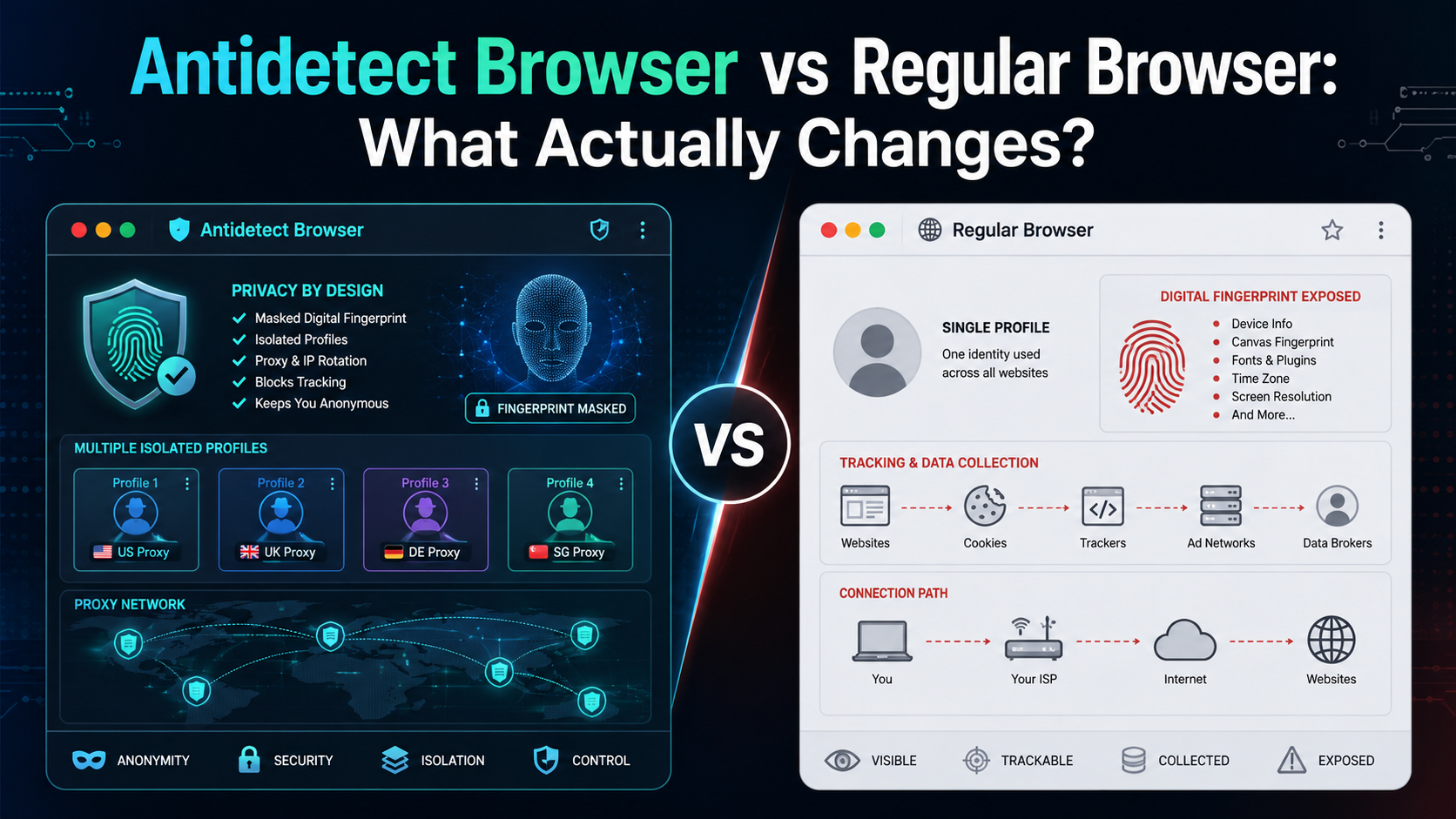

If an antidetect browser looks almost the same as Chrome, Firefox, or Edge, what actually makes it different?
The biggest difference is not how websites look or how fast pages load. It is how the browser manages your digital environment.
A regular browser is designed mainly for everyday browsing. An antidetect browser is designed to create and manage multiple isolated browser profiles, each with its own cookies, sessions, proxy settings, and fingerprint-related parameters.
In simple terms:
A regular browser manages browsing. An antidetect browser manages browser identities.
Here is what that means in practice.
Antidetect Browser vs Regular Browser: Quick Comparison
| Feature | Regular Browser | Antidetect Browser |
|---|---|---|
| Main purpose | Everyday web browsing | Managing isolated browser profiles |
| Cookies | Stored by browser/profile | Isolated by profile |
| Browser fingerprint | Mostly based on real device | Managed separately for each profile |
| Proxy management | Usually manual | Often assigned per profile |
| Multiple profiles | Basic support | Core functionality |
| Persistent sessions | Yes | Yes, separated by profile |
| Team workflows | Limited | Often supported |
| Best for | Personal browsing | Multi-profile workflows, testing, research, agencies |
The main difference is therefore profile isolation.
Regular browsers can create different profiles, but antidetect browsers are built around the idea that every profile should operate as a separate browser environment.
What Is a Regular Browser?

A regular browser is the type of browser most people use every day.
Examples include:
- Google Chrome
- Mozilla Firefox
- Microsoft Edge
- Safari
These browsers are designed for common activities such as browsing websites, watching videos, using web applications, storing passwords, saving cookies, and logging into online accounts.
Modern browsers already provide useful privacy and profile features.
For example, Chrome lets you create multiple browser profiles. Each profile can have separate bookmarks, extensions, login sessions, and cookies.
For many users, that is more than enough.
The limitation appears when you need to manage a large number of browser environments.
Even when cookies are separated, multiple profiles running on the same device can still share many characteristics of the same underlying system.
That is where browser fingerprinting becomes relevant.
What Is an Antidetect Browser?
An antidetect browser is a browser designed to create and maintain multiple isolated browser profiles.
Each profile can have its own:
- cookies;
- local storage;
- browsing sessions;
- proxy settings;
- browser configuration;
- fingerprint-related parameters.
Instead of thinking of a profile as simply another login inside the same browser, an antidetect browser treats every profile more like an independent browsing environment.
For example, imagine managing 30 different projects.
With a regular browser, you may need to combine browser profiles, proxy extensions, spreadsheets, login credentials, and manual configuration.
With an antidetect browser, those environments can be organized as separate profiles inside one management system.
Platforms such as Hidemium are designed around this profile-based workflow.
1. Browser Fingerprint Is the Biggest Difference
Cookies are not the only way websites can distinguish between browser environments.
When you visit a website, the browser may expose multiple technical characteristics, including:
- operating system;
- browser version;
- screen resolution;
- timezone;
- language;
- fonts;
- WebGL information;
- Canvas output;
- hardware characteristics;
- WebRTC-related information.
Combined together, these signals can contribute to what is commonly called a browser fingerprint.
Regular browsers
A regular browser generally reflects the actual environment of the device.
Creating another Chrome profile may give you separate cookies, but both profiles are still running on the same machine.
As a result, many device-related properties can remain similar.
Antidetect browsers
An antidetect browser gives users more control over the browser environment associated with each profile.
The objective is not simply to generate random values.
A well-configured profile should maintain a consistent environment so that the different browser parameters make sense together.
That is one of the fundamental differences between an antidetect browser and a regular browser.
2. Profile Isolation Goes Beyond Cookies
Regular browsers already support multiple profiles, so why use an antidetect browser?
The answer is the level of isolation and management.
In a normal browser, profiles are mainly a convenience feature.
You might use:
- one profile for work;
- one profile for personal browsing;
- another profile for a separate Google account.
An antidetect browser makes the profile itself the core unit of the workflow.
Each profile can maintain its own browsing state, including cookies, sessions, settings, and network configuration.
This matters when you need to maintain many persistent environments over time.
Instead of repeatedly logging in, clearing cookies, changing proxies, or rebuilding sessions, you reopen the same profile and continue working in the same environment.
3. Incognito Mode Is Not an Antidetect Browser
A common misconception is that Incognito Mode provides the same functionality as an antidetect browser.
It does not.
Incognito Mode mainly creates a temporary browsing session.
When you close the window, the browser typically removes newly created cookies and browsing history from that session.
However, Incognito Mode does not create a new device.
Your underlying:
- operating system;
- screen;
- browser engine;
- hardware;
- network environment;
do not suddenly become completely different.
So the difference is simple:
Incognito Mode = temporary session
Antidetect browser = managed browser environment
If your goal is simply to prevent local browsing history from being saved, Incognito Mode may be enough.
If you need multiple persistent and isolated browser environments, it solves a different problem.
4. Proxy Management Is Easier at Scale
Both regular browsers and antidetect browsers can work with proxies.
The difference is how those proxies are managed.
In a normal browser, you may need to configure a proxy through:
- your operating system;
- an extension;
- browser settings;
- third-party software.
This works well if you only use one or two configurations.
It becomes more complicated when different browser profiles need different proxies.
Antidetect browsers commonly allow a proxy to be assigned directly to each profile.
For example:
Profile A → Proxy A
Profile B → Proxy B
Profile C → Proxy C
This makes larger profile setups easier to organize.
It is also important to understand that a proxy and an antidetect browser solve different problems.
A proxy primarily changes the network connection and public IP.
An antidetect browser primarily manages the browser environment.
Using a proxy alone does not create an isolated browser identity.
5. Antidetect Browsers Are Built for Multi-Profile Workflows
For everyday browsing, managing dozens of browser environments makes little sense.
Most people only need a few accounts and one regular browser.
But some legitimate workflows require more separation.
Examples include:
QA and website testing
Developers may need to test how websites behave across different environments, locations, languages, or sessions.
Localization testing
Teams may need to reproduce browsing environments for different regions or language settings.
Agency workflows
Agencies managing authorized client accounts may want to keep each client's cookies and sessions separated.
E-commerce operations
Teams operating multiple authorized storefronts or workspaces may prefer isolated environments instead of constantly switching sessions.
Market research
Researchers may need different browser environments when analyzing websites, advertisements, or localized experiences.
In these situations, the main benefit is not simply privacy.
It is organization and operational consistency.
6. Regular Browsers Are Still Better for Normal Browsing
An antidetect browser is not automatically better than Chrome or Firefox.
For most everyday activities, a regular browser is easier.
If you mainly:
- check email;
- watch YouTube;
- browse websites;
- shop online;
- use one or two social accounts;
- work with regular SaaS tools;
then Chrome, Firefox, Safari, or Edge will usually be enough.
An antidetect browser becomes useful when browser environments themselves become something you need to manage.
The more profiles, sessions, proxies, and projects you need to maintain, the larger the difference becomes.
Antidetect Browser vs Regular Browser vs Incognito
Here is the simplest comparison.
| Feature | Regular Browser | Incognito | Antidetect Browser |
|---|---|---|---|
| Daily browsing | Excellent | Good | Possible |
| Persistent cookies | Yes | No after session | Yes |
| Basic multiple profiles | Yes | No | Yes |
| Temporary sessions | Yes | Yes | Yes |
| Fingerprint management | Limited | Limited | Core feature |
| Proxy per profile | Usually manual | Usually manual | Common |
| Large profile management | Limited | No | Designed for it |
| Team workflows | Limited | No | Often available |
For normal personal browsing, choose a regular browser.
For a temporary session, use Incognito Mode.
For managing many persistent browser environments, an antidetect browser is the more specialized option.
Does an Antidetect Browser Make You Anonymous?
No browser can guarantee complete anonymity.
Websites may use many types of signals beyond browser fingerprinting, including:
- IP address;
- cookies;
- account information;
- login history;
- behavioral signals;
- information submitted by the user.
An antidetect browser primarily helps manage browser environments and profile separation.
It should not be treated as a tool that makes every online activity invisible or undetectable.
That is also why claims such as “100% anonymous” or “completely undetectable” should be treated carefully.
The practical value of an antidetect browser is better described as isolation, consistency, and profile management.
Who Actually Needs an Antidetect Browser?
You probably do not need one if you only use a few personal accounts.
An antidetect browser becomes more relevant when you repeatedly need to manage multiple isolated environments.
Ask yourself:
- Do I need many persistent browser profiles?
- Does every profile need separate cookies and sessions?
- Do I need different proxy configurations for different profiles?
- Am I constantly logging in and out of accounts?
- Does my team need to organize browser environments by project or client?
If most answers are no, a regular browser is probably enough.
If several answers are yes, a specialized browser profile manager may significantly simplify the workflow.
What to Look for in an Antidetect Browser
If you decide to use one, focus on more than just the number of fingerprint settings.
A practical antidetect browser should provide:
Reliable profile isolation.
Cookies and sessions should remain separated between profiles.
Consistent browser environments.
Fingerprint-related parameters should form a coherent environment.
Easy proxy management.
You should be able to associate network configurations with individual profiles.
Profile organization.
Searching, naming, grouping, and managing profiles becomes important as the number grows.
Stable sessions.
Returning to a profile should allow you to continue working without constantly rebuilding its environment.
Team capabilities.
For organizations, profile sharing and access management can become important.
These are also the areas worth evaluating when considering an antidetect browser such as Hidemium.
Final Verdict
The difference between an antidetect browser vs regular browser is not simply privacy.
It is how browser environments are managed.
A regular browser is designed primarily for everyday internet use.
An antidetect browser is designed to maintain multiple isolated browser profiles with their own cookies, sessions, proxies, and fingerprint-related configurations.
So the choice is straightforward:
Use a regular browser for normal browsing and a small number of accounts.
Use Incognito Mode when you only need a temporary browsing session.
Use an antidetect browser when you need to manage multiple persistent browser environments efficiently.
If your workflow has reached the point where ordinary browser profiles, extensions, proxies, and spreadsheets are becoming difficult to manage, explore Hidemium to see how dedicated browser profile management can simplify the process.
Frequently Asked Questions
What is the difference between an antidetect browser and a regular browser?
A regular browser is designed mainly for normal web browsing. An antidetect browser adds advanced profile isolation and lets users manage separate cookies, sessions, proxies, and fingerprint-related settings for different browser profiles.
Is Incognito Mode an antidetect browser?
No. Incognito Mode creates a temporary browsing session but does not create an independently managed browser environment.
Can Chrome create multiple browser profiles?
Yes. Chrome supports multiple profiles, which is sufficient for many users. Antidetect browsers are more focused on managing larger numbers of isolated environments.
Does an antidetect browser change your IP address?
Not automatically. IP addresses are generally controlled through your network connection, VPN, or proxy. Many antidetect browsers allow a different proxy to be assigned to each browser profile.
Is an antidetect browser better than Chrome?
It depends on the use case. Chrome is generally better for everyday browsing. An antidetect browser is more appropriate when you need multiple isolated and persistent browser environments.
Bản này mình thấy đúng form cho keyword hơn bản trước: vào thẳng câu trả lời, comparison table xuất hiện sớm, chỉ giữ 6 khác biệt có ý nghĩa và CTA Hidemium không bị nhồi quá nhiều.
Related Blogs

In the SEO space, many businesses and agencies build blogging strategies from scratch, focusing on optimizing website rankings through quality content. However, a common challenge is Manage multiple Ahrefs accounts for multiple clients or share access that no additional user fees for Ahrefs.Hidemium who share how Share Ahrefs account safely, comply with terms and avoid the risk of being locked[…]

As AI increasingly plays a vital role in optimizing work performance, choosing the right artificial intelligence model becomes a crucial factor. The three prominent names today – ChatGPT, Gemini, and Claude – are powerful tools in the AI field for automation.So, between these three models, which one is the optimal choice for specific needs? This article will compare ChatGPT, Gemini, and Claude[…]
.png)
In the digital era, no-code automation has become an essential trend for individuals and businesses to optimize their workflows. However, many people struggle with automation due to a lack of coding skills, making repetitive task automation seem out of reach.So how can someone with no coding background still create powerful automation scripts?The answer lies in the AI Prompt Script on Hidemium –[…]

If you already know how affiliate marketing works, then learning about the AliExpress Affiliate program will be a good choice. If you don’t know, learn about affiliate marketing first!What is the AliExpress affiliate program?The AliExpress affiliate program, like all other affiliate programs, pays a commission based on products sold through the affiliate. So you earn commissions by promoting and[…]

When applied correctly, the 10 Antidetect Browser tips not only significantly reduce the risk of account restrictions but also enhance stability in multi-account management. Close synchronization between browser fingerprints, IP addresses, and access behavior helps platform AI systems assess activity as more natural.In addition, these techniques optimize marketing operations, save management[…]

The choice AweSun – secure remote access software plays a vital role in helping large businesses, freelancers, and remote workers overcome the barriers of connecting and controlling computers in different locations. The right tools will give you the ability to seamless collaboration, session access and remote file transfer fast, efficient troubleshooting support anywhere in the world.To help you[…]
