How to Fake IP Effectively Using VPN and Proxy –Ultimate Guide in 2025


Changing a VPN is an important solution to help users stay anonymous, secure personal information, and access regionally blocked websites. Especially in the digital age, when privacy threats are increasing, using a VPN is a smart choice to protect your identity online. Together Antidetect Browser Hidemium Learn how to change VPN simply and effectively on both computers and laptops.

1. Instructions for changing VPN on your computer to safely fake IP
Below are two popular ways to change VPN on your computer to help you easily fake IP and access global content.
1.1 How to change VPN on PC/Laptop using browser extension
If you want to quickly change VPN without installing complicated software, browser extensions are the ideal choice:
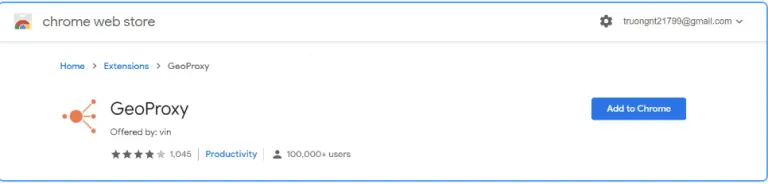
Step 1: Download and install a VPN browser extension (eg GeoProxy).
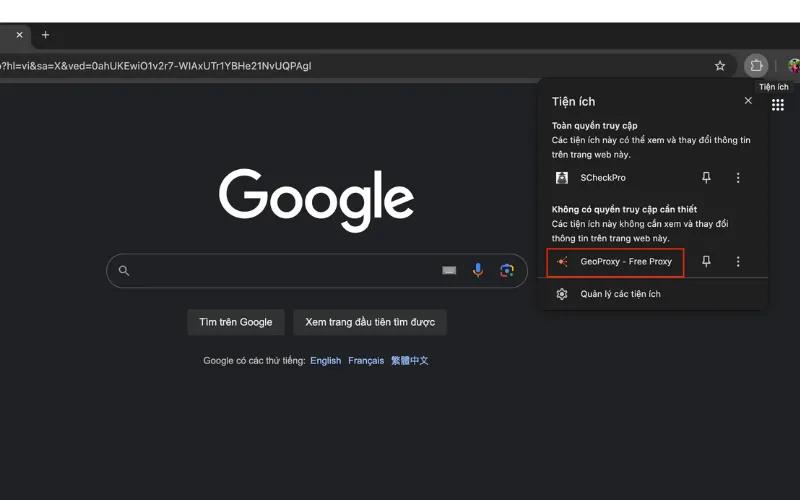
Step 2: After installation, click the Extensions icon in the right corner of the browser and select GeoProxy.
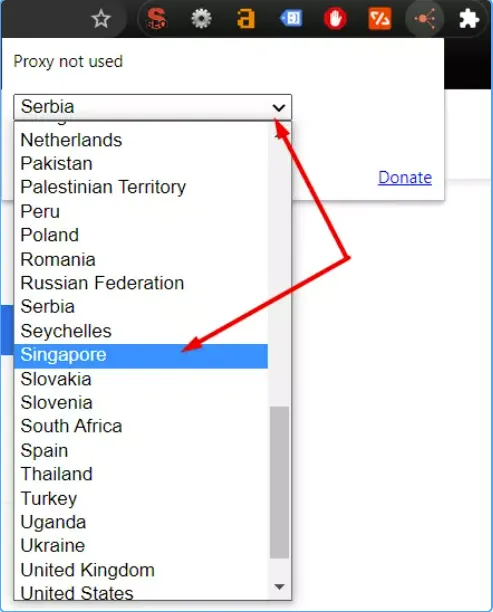
Step 3: Select the country you want to fake IP to access restricted content.
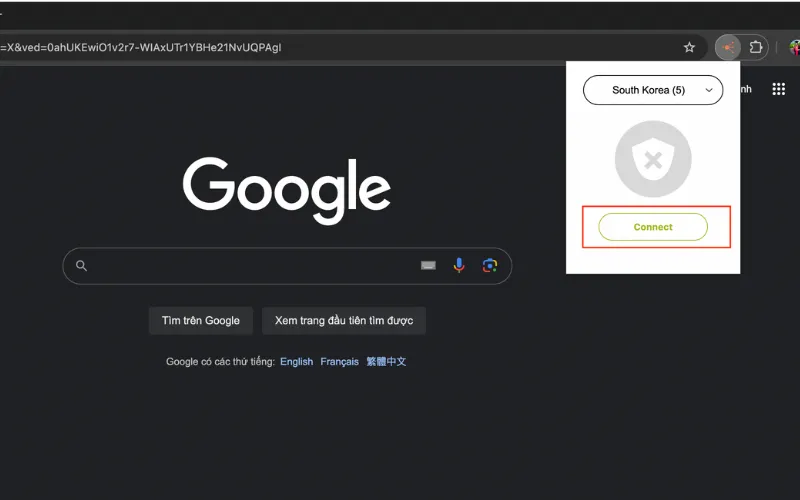
Step 4: Click Connect to start the VPN connection. When you no longer need it, you can disconnect by pressing Cancel.
This method is suitable for users who want quick access and does not require much technical work.
1.2 How to change VPN on laptop running Windows 11
For users using Windows 11 laptops, you can configure VPN manually as follows:
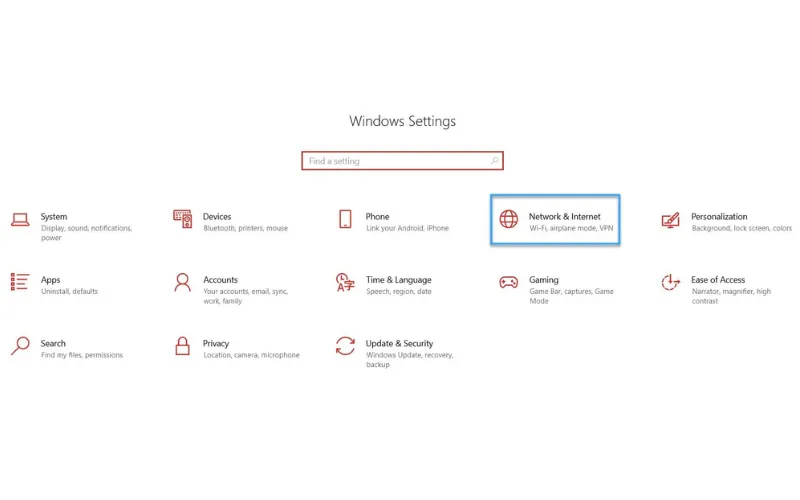
Step 1: Open Start Menu → select Settings → go to Network & Internet → click VPN.
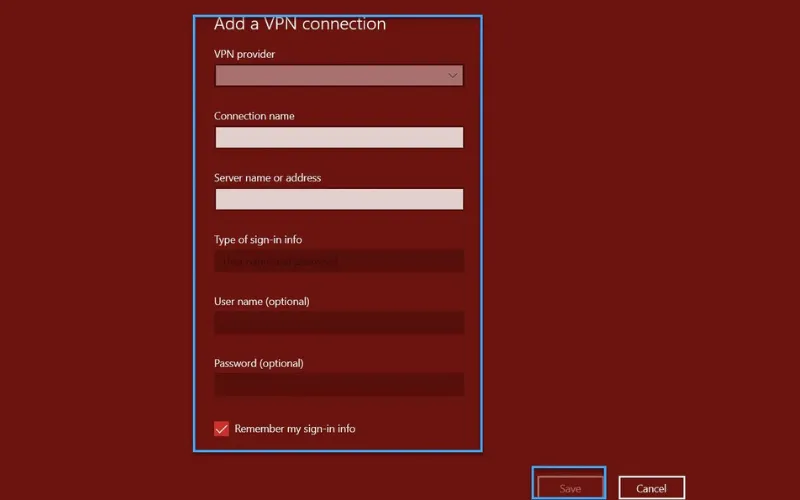
Step 2: Click Add VPN → select Windows (built-in) in the VPN provider section. Enter the connection name, VPN server address, protocol (PPTP, L2TP/IPSec, OpenVPN...), and login information (if any), then click Save.
Step 3: In the VPN list, select the connection you just created and click Connect to start using.
This method provides greater stability and security when using paid or individually configured VPN services.
>>> Learn more: Top 10 best free VPN apps for Android in 2025
2. Instructions on how to change VPN on your phone quickly and effectively
Changing VPN on your phone not only helps you improve Internet access speed but also helps secure personal information and access region-restricted content. Below are detailed instructions on how to change VPN on iPhone and Android easily in just a few steps.
2.1 How to change VPN on iPhone
To change VPN on iPhone device, follow these steps:
Step 1: Access Settings → General → VPN & Device Management. Here, you can:
View a list of pre-set VPN configurations
Add new VPN configuration to suit your needs
Modify or delete existing VPN configurations
Enable or disable VPN connection quickly
Step 2: Click on the VPN section to see the list of available servers, including:
VPN configuration name
VPN type (IKEv2, L2TP/IPsec, OpenVPN)
Connection status (Active or Inactive)
Step 3: Select "Add VPN Configuration", then select the VPN type and enter server information if you already have it.
Step 4: Provide necessary information such as server address, username, password, etc. Click "Done" to save the configuration, then activate the VPN connection. So you have completed how to change VPN on iPhone.
In addition, you can also download famous VPN applications such as NordVPN, ExpressVPN from the App Store, open the application and select the desired server location to connect in just a few seconds.
2.2 How to change VPN on Android
With Android phones, changing VPN becomes extremely convenient thanks to reputable free applications. Hidemium suggests you use Snap VPN to get started:
Step 1: Download Snap VPN from Google Play Store
Step 2: Open the application, grant necessary access permissions as required
Step 3: Click on “Location” to select the desired country or server. Prioritize servers with fast, stable speeds and clear security policies
Step 4: Click “Go” to set up and start connecting to VPN
Step 5: When you no longer need to use it, just select "Disconnect" to disconnect

Using a VPN on your phone not only helps you access blocked websites, but also increases security when using public networks. With the above instructions, you know how to change VPN on both iPhone and Android easily, quickly and effectively.
3. Effective methods to fake IP address using VPN
Besides the traditional ways to change VPN, you can absolutely use a number of other solutions to fake your IP address through VPN, helping to protect your identity and increase your ability to access the internet more securely:
Browser VPN extensions: Popular browsers like Google Chrome and Mozilla Firefox now support many free VPN extensions. Just download and install the appropriate utility, then connect to the VPN server, you can easily access region-restricted websites and anonymize your real IP address.
Use VPN via router: If you need to connect multiple devices to the VPN network simultaneously, installing a VPN application on the router is a smart choice. At that time, every device connected to the router's Wi-Fi network will automatically be encrypted via VPN, helping you fake IP simultaneously and increase security.
Combine Proxy with Antidetect Hidemium browser: For those who work in the MMO field or need to manage multiple online accounts, using a Proxy combined with an antidetect browser like Hidemium is the optimal solution. Hidemium helps you completely hide Browser Fingerprint, while creating independent virtual identities for each profile. Thanks to that, you can access the web, fake IP, stay anonymous and operate multiple accounts without worrying about being detected or flagged for violations.
Besides using free IP fake tools, if you are looking for a more comprehensive solution in terms of security, speed and anti-detection capabilities, try Hidemium - the leading anti-detect browser today. Hidemium supports a 3-day free trial, giving you peace of mind before deciding to upgrade.
>>> Learn more: Top 15 trustworthy free proxy websites
Above To be Effective ways to change VPN and fake IP, including using browser utilities, VPN on routers and especially Proxy combined with Hidemium. These are solutions suitable for the needs of information security, overcoming content censorship and operating a diverse account system. If you have questions about VPN or need support using Hidemium, contact us for detailed answers.
>>> ARTICLES WITH THE SAME TOPIC:
Related Blogs

Trong sự kiện đáng chú ý, chúng tôi rất vui thông báo rằng Hidemium V4 đã được hoàn thiện và chính thức đi vào hoạt động! Phiên bản này không chỉ là một bản cập nhật đơn giản mà còn là một bước tiến lớn đánh dấu sự thay đổi hoàn toàn của Hidemium. Cùng đồng hành với chúng tôi khám phá vẻ mới mẻ, tính năng độc đáo và hiệu suất vượt trội mà Hidemium V4 mang lại. Hãy là những người đầu tiên trải[…]

Did you know? More than 25% of professional eBay sellers are using multiple accounts to increase revenue, spread risk, and avoid permanent bans. However, managing multiple eBay accounts without getting caught is a major challenge—unless you have the right tools.If you are really interested in multi-account eBay, selling anonymously or implementing dropshipping at scale, you've probably[…]
In this guide, we'll explore the best CAPTCHA solving service options available today, particularly focusing on their applications in web scraping operations.Web scraping has become indispensable for various stakeholders including researchers, data analysts, academic institutions, enterprises, and website administrators. However, due to the misuse of scraping tools by malicious bots and bad[…]

In the world of computer networks, network Topology plays an important fundamental role in helping devices connect, transmit data and operate effectively. So what is Topology? Why is it important in LAN (Local Area Network) systems? In this article Antidetect Browser Hidemiumwill help you understand more about Topology in LAN, analysis Most common Topology types with Advantages and disadvantages[…]

In today's digital landscape where cybersecurity is paramount, Cloudflare emerges as a powerful shield against malicious bots and cyber attacks. However, what happens when legitimate data access or task automation is required? This detailed guide explores proven techniques and methodologies for navigating Cloudflare's security measures. Whether you're a data extraction specialist, automation[…]

In the process of doing business online, many sellers face the problem of accounts being repeatedly suspended even though their content does not violate any rules and their ads fully comply with platform policies. This leads to business disruptions, declining revenue, and major difficulties in scaling operations. The root cause lies in poor digital identity management.That is why more and more[…]
