How to Manage Multiple WhatsApp Accounts Safely in 2026

In 2026, WhatsApp has evolved from a basic messaging app into a vital platform for affiliate marketers, e-commerce businesses, and digital agencies. For professionals in these sectors, managing multiple WhatsApp accounts is no longer an optional convenience but an operational necessity. Yet, WhatsApp's steadfast adherence to its "one account per device" policy adds complexity to this requirement.
Mishandling your account portfolio could result in more than just temporary lockouts; it could trigger a devastating cascade of "chain bans." Such bans can obliterate substantial lead pipelines and tarnish brand reputations in an instant. This guide offers a tried-and-tested strategy for managing 2, 10, or even 100+ WhatsApp accounts across various devices—mobile and desktop—while minimizing risks and optimizing scalability.

Is It Possible to Use Multiple WhatsApp Accounts on a Single Device in 2026?
Balancing user convenience with account security remains a challenge. While WhatsApp has extended its "multi-device" functionality—allowing one account to operate on up to four connected devices—it still lacks native support for running multiple accounts on the same device.
The main obstacle is the phone number requirement. Since each account is tied to a unique identifier, you can't switch between multiple accounts within a single instance of the official app. For those handling small operations, the solution lies in using additional official apps or OS-level app cloning. On an enterprise scale, the answer involves using virtual environments—supported by tools like Hidemium—that sidestep hardware dependency altogether.
Can You Use the Same Phone Number for Two WhatsApp Accounts?
No, this remains technically impossible under WhatsApp's current architecture. The platform uses your phone number as the primary cryptographic key for account identification.
Key Facts About Account Registration
- Unique Identity Requirement: Each account must be linked to a separate, active phone number.
- Automatic Deactivation: If a phone number already tied to one account is used to register another, the first account will automatically deactivate.
- Trust Score Risks: Virtual numbers (such as those from Google Voice or TextNow) may seem like a quick fix, but WhatsApp's algorithms often assign them low trust scores due to their frequent association with spam or fraudulent activity. Using such numbers greatly increases the likelihood of shadowbans or being flagged for "account farming," which can restrict your ability to send messages.
Best Approaches for Setting Up Two WhatsApp Accounts on One Mobile Device
For individuals managing limited traffic, mobile devices are the easiest way to handle multiple accounts. This typically involves leveraging OS-level tools or using official WhatsApp apps strategically.
WhatsApp + WhatsApp Business
This dual setup is the safest approach for small-scale operations. By using both the standard WhatsApp Messenger app and the WhatsApp Business counterpart on the same device, you’re able to independently manage two accounts without risking penalties. Since both apps are official, they adhere to WhatsApp’s policies, minimizing the risk of account suspension that comes with cloned or modified apps.
App Cloning or Dual Apps (Android)
Android users can tap into features such as "App Twin," "Dual Apps," or third-party apps like "Parallel Space" to run additional WhatsApp accounts. While this can work effectively for managing three or four accounts, keep in mind that cloned app environments typically lack the same security integrity as native apps. Advanced detection algorithms might spot such setups as anomalies, possibly prompting a review of your activity.
iOS Limitations and Workarounds
On iOS, Apple’s strict restrictions make running multiple WhatsApp accounts challenging. The most secure option is sticking with the dual-app method (standard WhatsApp + WhatsApp Business). Alternatives like third-party app stores or sideloaded applications usually require jailbreaking the device, which not only compromises security but severely increases the risk of permanent bans.
Scaling Operations on PC: Managing Dozens of Accounts
High-volume operations involving dozens—or even hundreds—of accounts migrate to desktop setups for ease of use and integration with CRM tools. Despite offering greater efficiency, desktop environments also come with their own challenges related to account security and scaling.
WhatsApp Web in Standard Browsers: A Fragile Solution
Running multiple WhatsApp Web sessions via incognito tabs or separate browsers is highly risky and impractical for scaling. Such setups often rely on shared cookies and identical hardware IDs across sessions. If one account is flagged—possibly due to spam activities—WhatsApp can easily track and penalize connected sessions on the same system, leading to a “chain ban” effect.
Antidetect Browsers: A Safer Alternative for Enterprise-Level Management
Organizations handling 20, 50, or even 100+ accounts rely on antidetect browsers for greater anonymity and account isolation. These browsers create unique digital fingerprints—including changes to parameters like Canvas.
Managing multiple social media accounts, especially on platforms like WhatsApp, has become a high-stakes game for account managers and digital marketers. While some setups thrive undetected, others find themselves flagged, restricted, or outright banned. Why does this happen? The key lies in understanding what platforms like WhatsApp monitor—digital footprints—and deploying the right strategies to stay under the radar.
The Risks of Getting Flagged
Platforms such as WhatsApp use sophisticated algorithms to detect "bot-like" behavior, identifying patterns that don't align with human activity. Here are some common triggers for account bans:
- IP Address Inconsistencies: Logging into multiple accounts from the same data center IP address is a major red flag. To counter this, professionals utilize Residential or 4G/LTE proxies, which emulate legitimate mobile user behavior and reduce suspicion.
- Hardware Linking: Managing dozens of accounts with identical device identifiers, such as the same MAC address or browser version, is another practice that gets accounts linked and banned.
- Unnatural Behavior: Activities like sending 500 outbound messages from a newly created account without receiving any significant replies can seem suspicious and lead to immediate restrictions.
Understanding these risks helps avoid triggering the platform’s preventive measures.
Collaborating Without Tripping Platform Alarms
Things can get even trickier when teams collaborate on the same WhatsApp accounts across different locations, causing issues like *security verification loops*. When someone attempts to log in from a new device or from a different city, WhatsApp detects this as a possible breach and may lock the account or demand two-factor authentication.
Scaling Seamlessly with Multiple Accounts
In today’s marketing world, relying on just one WhatsApp or social media account is rare. Agencies and marketers often juggle client profiles, brand pages, backup accounts, and region-specific campaigns—all at once! To do this securely without raising flags or risking account linkage, professionals turn to tools like Hidemium.
Here’s what this advanced tool offers:
- Isolated browser profiles for every account
- Unique digital fingerprints that mimic individual user devices
- Security against cross-linking of accounts
- Seamless daily management of activities across all accounts .
With these features in place, you ensure every account operates as if it belonged to a unique, independent user.
Why Acting ‘Human’ Makes All the Difference
The secret to staying safe while managing multiple social media accounts lies in behaving like an ordinary user—avoiding anything that could be seen as robotic or unnatural. That’s precisely where Hidemium shines:
- Assigns unique fingerprints to each account so no two profiles appear linked.
- Ensures consistent activity patterns for each account, mimicking legitimate usage behavior.
- Helps maintain security with minimal manual effort while scaling operations effectively.
In essence, mastering multi-account management requires combining a deep understanding of platform logic with smart tools that make scaling safe and seamless. With solutions like Hidemium, marketers can focus on engagement without worrying about account bans or restrictions. Don’t just survive the game—win it by playing it smarter!
Automate account engagement
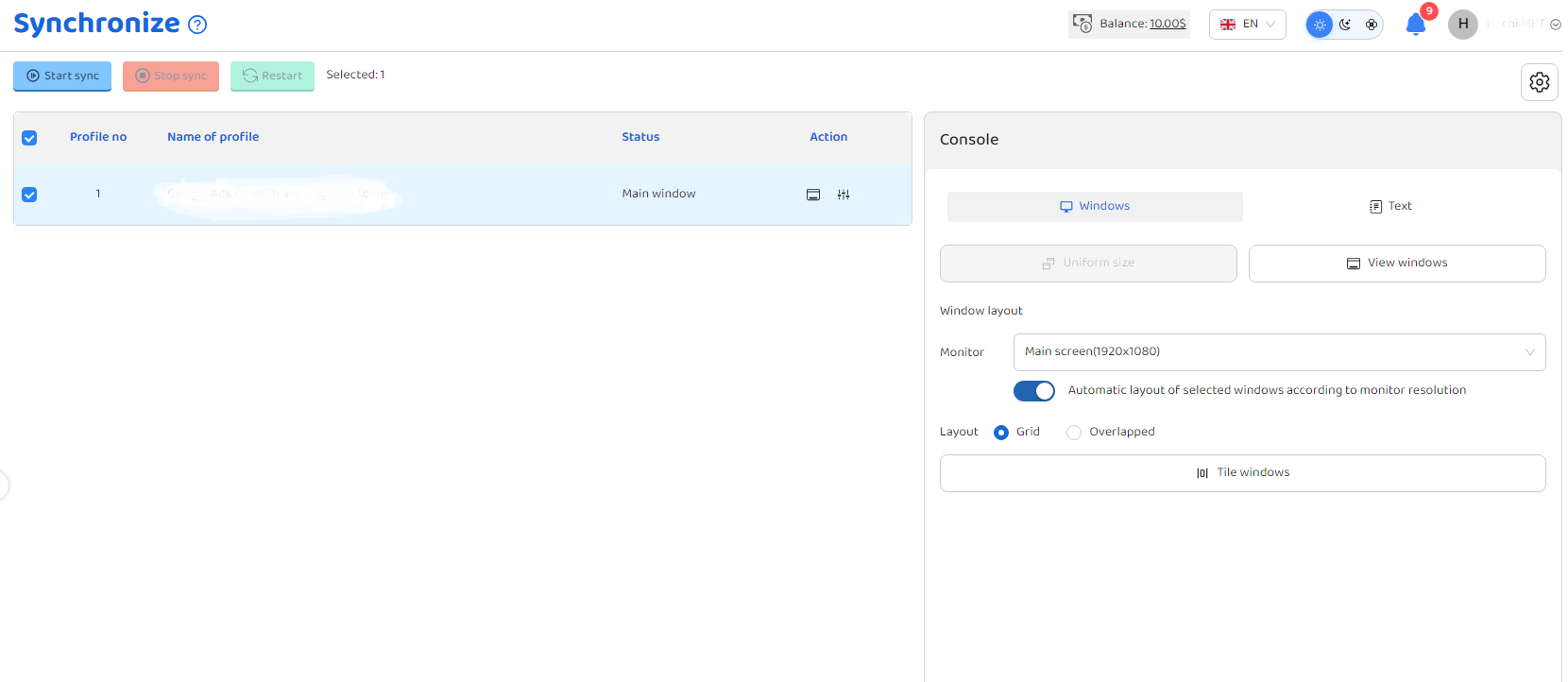
Keep your accounts active and consistently engaging with Hidemium’s built-in automation capabilities. By defining actions clearly, repetitive tasks can be handled efficiently, while multi-profile synchronization allows you to like, comment, and follow across multiple accounts at the same time—mimicking natural user behavior for safer operations.
- Act like a real user to stay under the radar
- Automatically like, comment, and interact
- Reduce repetitive tasks and save valuable time
Conclusion
Managing multiple WhatsApp accounts in 2026 is no longer just a workaround—it’s a matter of building the right infrastructure. While the platform intentionally limits scalability, it is still achievable through strict session isolation and advanced antidetect environments. By ensuring each account has a unique digital identity and leveraging tools like Hidemium to manage, automate, and synchronize activities, you can create a scalable system that remains stable even under increasingly strict platform controls.
Related Blogs

📅 Updated: June 2026 — This list has been reviewed and refreshed for accuracy.In the digital age, as internet usage becomes more widespread, so do threats from viruses and hackers stealing data. That’s why proxy servers have become essential tools, helping users safeguard their personal information and access the web more securely.This article by Hidemium introduces you to the 15 best free proxy[…]
.png)
In an era where online privacy and multi-account management have become vital for MMO, dropshipping or marketing people, antidetect browsers act as a "powerful assistant". Among them, XLogin used to be known as a popular choice. However, by 2025, many users began to question XLogin's stability, browser camouflage, and performance.So where is it? the most reliable XLogin alternative today? In this[…]

In the following analysis, Hidemium will review anti-detection browsers in detail, focusing on three tools from China: YunLark, Maskfog, and VMMask. These browsers are designed to suit the Chinese Internet environment, comply with the “great firewall” and support VPN connections.However, to deploy advertising on international platforms, users often need more advanced tools. This is also the[…]

5 Best Places to Buy Taboola Agency Ad Accounts in 2026Scaling native ads on Taboola sounds straightforward until you actually try it. Standard accounts come with tight spending caps, slow approval queues, and a warming period that can drag on for weeks before you see real results. For media buyers and performance marketers managing substantial budgets, that level of friction is more than just a[…]

Amazon and Amazon Marketplace are part of the same e-commerce ecosystem, but they are not the same selling model. Amazon Retail sells products directly to customers, while Amazon Marketplace allows third-party sellers to list and sell products through Amazon’s platform.The main differences between Amazon vs Amazon Marketplace involve who owns the inventory, seller fees, fulfillment, customer[…]

When applied correctly, the 10 Antidetect Browser tips not only significantly reduce the risk of account restrictions but also enhance stability in multi-account management. Close synchronization between browser fingerprints, IP addresses, and access behavior helps platform AI systems assess activity as more natural.In addition, these techniques optimize marketing operations, save management[…]
