How to Unblock Contacts on Social Media: A Complete Guide

We've all been there: a heated argument, a messy breakup, or simply a need for a mental health break leads us to hit the "block" button. Setting these limits is a completely normal part of managing your social media digital boundaries. However, time heals all wounds, and circumstances change. Eventually, you might find yourself wanting to reverse that decision and reconnect online.
Whether you want to clear out an old grudge or genuinely want to restore connections with a former colleague, ex-partner, or distant family member, unblocking contacts on social media is a straightforward process. But before you dive into your app settings, there are a few technical nuances and social etiquette rules you should know.
Here is your comprehensive guide on how to safely and effectively unblock contacts, navigate privacy settings, and seamlessly restore your online relationships. And for those who manage multiple accounts across platforms — whether for business, marketing, or personal use — this guide also touches on how proper account and session management plays a role.

Understanding Digital Boundaries: Blocking, Muting, and Restricting
Before you dive into your social media settings to reverse a block, it is helpful to understand the different levels of account restriction available on most platforms today. Each option has its own behavioral impact on your digital identity and profile visibility.
Blocking vs. Muting: What's the Difference?
Blocking severs all ties. You cannot see their posts, and they cannot see yours — your profile essentially disappears from their view. Muting, on the other hand, is a quieter approach. It removes an individual's posts or stories from your daily feed, but you remain connected, and they can still view your profile and interact with your content.
For users managing multiple accounts — such as social media managers or affiliate marketers running separate brand profiles — understanding the distinction between these tools is crucial for maintaining clean, intentional digital relationships across each account.
Restrict vs. Unblock: Not the Same Thing
Instagram and Facebook offer a "Restrict" feature. Restricting someone means they can still see your posts and comment on them, but their comments are only visible to them (unless you approve them). Unrestricting someone simply removes this filter, whereas unblocking them rebuilds a bridge that was completely severed. If you previously chose the nuclear option and blocked someone, removing that block requires a few specific, platform-dependent steps.
How to Find Your Blocked Users List
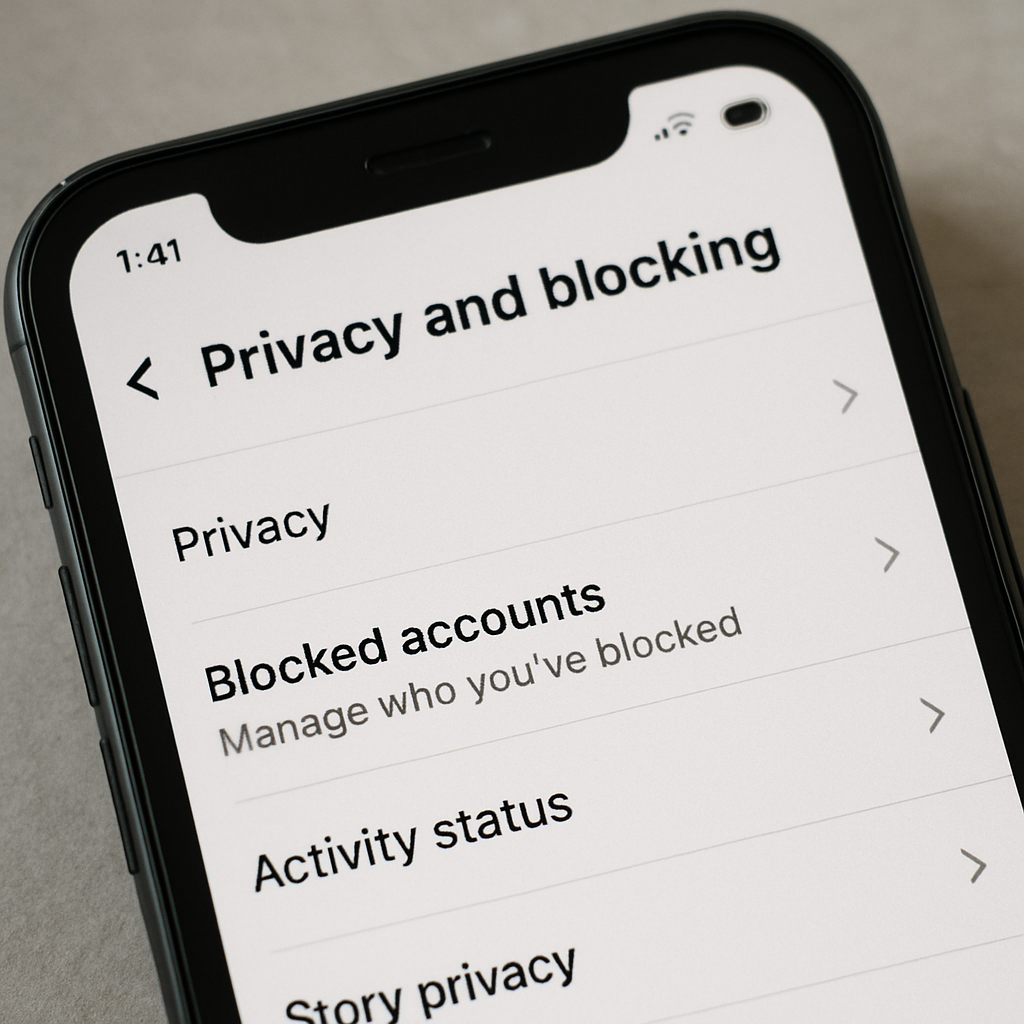
The first hurdle most people face is simply remembering where the block list lives. Knowing how to locate your blocked accounts list across different platforms can save you a lot of frustration and time.
Generally, finding the block list on both iPhone and Android involves similar steps, as the interface of major social apps is relatively consistent across both operating systems. The key is navigating to hidden account settings — usually tucked away under Privacy or Safety menus.
For power users who manage multiple social media profiles, tools like Hidemium antidetect browser allow you to run each account in an isolated browser profile, making it easier to manage separate block lists, privacy settings, and session data without cross-contamination between accounts.
Managing Privacy Settings on Instagram and Facebook
When unblocking contacts on Meta's platforms, the menus are closely intertwined but require separate actions for each app. Here is a clear breakdown for both.
How to Unblock on Facebook
- Open the Facebook app and tap the hamburger menu (three horizontal lines) in the bottom right (iPhone) or top right (Android).
- Scroll down and tap Settings & Privacy, then Settings.
- Scroll to the Audience and Visibility section and tap Blocking.
- Here, you will see your block list. Tap Unblock next to the specific name.
How to Unblock on Instagram
- Go to your Instagram profile and tap the three horizontal lines in the top right.
- Tap Settings and privacy.
- Scroll down to the Who can see your content section and tap Blocked.
- Tap Unblock next to the user's handle.
If you manage multiple Facebook or Instagram accounts for clients or campaigns, consider reading our guide on how to manage multiple Facebook accounts safely to ensure your accounts stay organized and protected.
WhatsApp Unblocking Procedures
WhatsApp blocking is highly personal because it ties directly to a user's phone number, making it one of the more privacy-sensitive unblocking situations.
Steps to Unblock on WhatsApp
- Open WhatsApp and go to Settings.
- Tap Privacy, then scroll down to Blocked Contacts.
- Tap the contact's name or number, and select Unblock.
A very common question here is: how to unblock someone on WhatsApp without them knowing? The good news is that WhatsApp is designed with privacy in mind. There are no alert banners or push notifications sent when you block or unblock someone. The only way they might figure it out is if they suddenly see your profile picture and online status reappear.
Another frequent concern is recovering deleted chat history after unblocking. Unfortunately, unblocking a contact does not restore conversations you deleted locally from your device. Unless you have a recent cloud backup (via Google Drive or iCloud) from before you deleted the chat, those past messages are permanently gone.
Unblocking on X (Formerly Twitter) and TikTok
How to Unblock on X (Twitter)
- Tap your profile picture, then go to Settings and Support > Settings and privacy.
- Select Privacy and safety, then Mute and block.
- Tap Blocked accounts and toggle the block button off.
How to Unblock on TikTok
- Go to your profile and tap the three-line menu.
- Select Settings and privacy, then Privacy.
- Scroll to the bottom and tap Blocked accounts.
- Tap Unblock next to the user.
TikTok and X are particularly relevant for content creators and social media managers who maintain separate accounts for different niches or brand personas. Managing block and unblock activity across multiple accounts on these platforms requires careful attention to each profile's privacy settings and session state.
What Happens After You Unblock Someone?
Reversing a block alters the digital landscape between you and the other user. It is crucial to understand what changes — and what does not — so you are not caught off guard.
Will They Get a Notification When You Unblock Them?
This is arguably the most common concern when managing blocked users. The definitive answer is: No. Social media platforms prioritize user privacy in these scenarios. Whether you are using Instagram, Facebook, TikTok, or WhatsApp, the other person will not receive a notification stating "John Doe has unblocked you."
However, they might figure it out organically if they search for your profile and realize they can suddenly see your content again. Your profile visibility effectively resets to your default public or private setting the moment the block is lifted.
Profile Visibility and Post History After Unblocking
Once you remove a block, your profile visibility resets to whatever your baseline privacy settings dictate. If your account is public, the unblocked user can immediately view your profile. You will also regain the ability to view their past public posts, photos, and updates — catching up on what you missed during the blocked period.
Do You Need to Re-Add Friends After Unblocking?
One of the biggest misconceptions about unblocking is that it automatically restores your previous friendship or follow status. It does not. When you block someone on platforms like Facebook or Instagram, the platform automatically forces both parties to unfriend or unfollow each other. Therefore, after you lift the block, you will need to actively send a new friend request or tap the "Follow" button again to fully restore the connection.
Troubleshooting Common Unblocking Issues
Sometimes the process is not as smooth as tapping a single button. Here are the most common technical roadblocks and what they mean.
"Why can't I see their profile after unblocking?" If you have successfully removed someone from your block list but still cannot find their account, one of three things has likely happened:
- They blocked you too: If you mutually blocked each other, lifting your block only removes your half of the restriction. They would still need to unblock you on their end before you can view their profile.
- They deactivated or deleted their account: The user may have left the platform entirely during the time they were blocked.
- They changed their username: If you are searching by an old handle, they may have rebranded their profile under a new name.
If you suspect they blocked you back, there is unfortunately no technical workaround that bypasses another user's privacy settings — nor should there be. Respecting digital boundaries is fundamental to healthy online behavior.
Best Practices to Restore Communication After Unblocking
Unblocking someone technically is one thing; navigating the social re-entry gracefully is another. If your goal is to genuinely repair a fractured relationship, the following steps can help you approach it thoughtfully.
Step 1: Evaluate Your "Why"
Before reaching out, ensure you are doing it for the right reasons. Are you looking for closure, aiming to rebuild a friendship, or simply feeling curious? Make sure you are emotionally prepared for any reaction — which may range from enthusiastic to entirely unresponsive.
Step 2: Take It Slow
Do not immediately flood their inbox with messages or mass-like their photos from the past two years. If you need to send a friend request to re-establish the connection, let the request speak for itself first. Wait for them to accept before initiating direct conversation.
Step 3: Send a Low-Pressure Opening Message
If they accept your request, keep the initial contact light and polite. Avoid diving straight into past drama. Acknowledge the gap in communication gently, but leave the ball in their court. Something like: "Hey, I know it's been a while — I hope you're doing well. Happy to catch up if you're ever open to it."
Step 4: Respect Their Reaction (or Lack Thereof)
Just because you are ready to reconnect does not mean they are. If they decline your friend request, leave you on "read," or politely decline to chat, accept their decision gracefully. Re-blocking out of spite is a poor habit; simply mute them or move on.
Managing Multiple Accounts and Social Media Privacy
For social media managers, marketers, and ecommerce professionals who manage numerous accounts across platforms like Facebook, Instagram, TikTok, and X, keeping track of blocked contacts, privacy settings, and session states is significantly more complex.
Each account operates with its own independent block list, privacy settings, and browsing session. Mixing sessions — for example, logging into multiple accounts within the same browser — can create technical issues such as session leakage or account flagging by platform detection systems.
This is where tools like an antidetect browser for multi-account management become relevant. An antidetect browser creates isolated browser profiles, each with its own set of cookies, local storage, and browser fingerprint — ensuring that each social media account operates in a completely separate, clean environment. This prevents cross-account contamination and reduces the risk of platform bans when managing multiple social media profiles simultaneously.
Hidemium, for example, is an antidetect browser purpose-built for workflows like social media management, affiliate marketing, and team-based account management — allowing teams to assign dedicated browser profiles to each account without the privacy risks associated with shared sessions.
Conclusion
Managing your online ecosystem requires a delicate balance of self-care, digital boundaries, and open communication. Unblocking contacts on social media is a powerful tool for forgiveness, growth, and moving forward. By understanding your platform's specific settings, knowing what happens to your profile visibility after lifting a block, and approaching the situation with emotional intelligence, you can navigate this tricky digital terrain with ease.
Social media is ultimately a tool designed to connect us. When you are ready to drop your digital walls and reconnect online, doing so thoughtfully ensures that your restored connections are built on a foundation of mutual respect and better digital habits.
Related Blogs

Owning and managing multiple advertising (Ads) accounts is essential for scaling campaigns. However, Facebook continuously tightens its detection mechanisms and is ready to disable multiple accounts at once if it detects that the login environment is not “clean.”In this article, we will guide you through building fully isolated browser environments to minimize abnormal flags and manage Facebook[…]
CAPTCHAs are designed to distinguish humans from bots, but in the fields of automation and software testing, bypassing this layer of protection is sometimes a necessary requirement. Dedicated CAPTCHA solving services meet that need by combining the power of algorithms with global human resources.In this article, Hidemium will analyze and compare the four leading platforms today — 2Captcha,[…]
In the field of affiliate marketing, cookie stuffing is a common form of fraud. This occurs when tracking cookies are installed on users' devices.without their knowledge. This allows fraudsters to receive commissions for actions they didn't actually commit.The consequences extend beyond just lost costs. Businesses also face issues such as inaccurate marketing data, unreliable performance reports,[…]

Selling on Amazon offers great profit potential, but success requires the right strategies. With fierce competition among millions of sellers, optimizing Amazon search engine optimization (SEO) and using Amazon Sponsored Products ads are the keys to increasing visibility and achieving sustainable sales growth. This article will guide you on how to increase Amazon sales by combining these two[…]
How humanizing AI content Brings Back the Personal Touch OnlineThe internet has changed the way we talk share and connect. Every post story, and caption reaches people around the world in seconds. But somewhere along the way, our online voices started to sound the same. Content feels fast but not always real. As AI tools become part of daily work, from writing captions to planning posts, many[…]
.png)
In an era where artificial intelligence is increasingly developing, anti-bot systems and automatic detection mechanisms are also increasingly sophisticated, making finding a antidetect browser Being truly effective is more difficult than ever. However, Hidemium and MuLogin still stand out as two options worth considering with strong anonymity capabilities, helping to maintain stable operations[…]
