What is WebGL? How to check and enable WebGL fingerprint effectively


Imagine you are relaxing after a day of work by playing a game on your browser, when suddenly a message appears: “Your browser does not support WebGL.” This will definitely make you upset as you cannot continue your experience.
At that point, you might be wondering: “Is there anything wrong with my device?” Don't worry! The problem is not with your device, but usually WebGL is not enabled in the browser or is related to the graphics card (GPU).
If you are not sure What is WebGL or how to fix this error, continue reading the article to understand how to check and activate WebGL fingerprint – an important factor in optimizing the graphics experience on modern browsers.
1. What is WebGL?
WebGL (Web Graphics Library)is a standards-based web graphics library OpenGL ES 2.0, which allows interactive 2D and 3D graphics to be displayed directly in the browser without the need for additional plugins. This technology was developed by the non-profit organization Khronos Group And is now widely integrated in popular browsers such as Google Chrome, Mozilla Firefox, Safari, Microsoft Edge, v.v.

>>> Learn more: What is WebGL? Do websites collect WebGL fingerprints?
2. How WebGL works
WebGL is based on a combination of three main programming languages: HTML5, JavaScript and GLSL (OpenGL Shading Language). Specifically:
GLSL used to write shaders – graphics code that executes directly on the GPU, increasing processing performance.
JavaScript and HTML5 acts as a coordinating language, creating an environment for displaying and managing graphical objects.
By leveraging the power of the GPU, WebGL enables web applications to achieve higher performance in displaying 3D images and smooth interactive effects, especially suitable for games, simulators and complex graphics platforms.
3. What are the benefits of using WebGL?
WebGL offers many outstanding benefits, especially the ability to display 3D graphics directly on the browser without installing additional software. This technology is easily integrated with HTML, works efficiently and supports multiple platforms, helping to optimize the user experience.
Here are 3 outstanding advantages of WebGL:
Handle complex tasks that many other graphics technologies cannot do, expanding the range of applications.
Powerful hardware acceleration, delivering superior performance in 3D games, simulations, and advanced visualizations.
Shader support, allowing the creation of realistic, vivid and in-depth graphic effects.
In addition, WebGL is also applied in many fields such as: architecture, game development, animated videos, molecular simulations... In addition, it also supports complex data visualization such as engineering survey maps or 3D medical MRI scans - helping to analyze and process information more intuitively.
4. Why doesn't your browser support WebGL?
There are many reasons why a browser may not support WebGL, and identifying the correct reason will help you quickly fix the error.
One of the common reasons is that you are using an old version of your browser – one that is not designed to support WebGL technology. In this case, simply updating to the latest version should fix the problem.
The second reason is that hardware acceleration may be disabled. While not required, many browsers – especially Google Chrome – require it to be enabled for WebGL to work properly. Therefore, you should check and re-enable hardware acceleration in your browser settings.
Another factor could be that your graphics card driver is outdated, unstable, or not powerful enough to support WebGL effectively. Updating your driver to the latest version will help increase compatibility and improve graphics display performance.
Additionally, some browsers may actively block the graphics card to prevent crashes or system errors – this also prevents WebGL from working properly.
Don't worry too much, in the next section we will guide you in detail on how to check and enable WebGL on each specific browser such as Chrome, Firefox or Edge.
>>> Learn more:How to identify anti detect with good fake Webrtc function
5. Instructions for checking and enabling WebGL to help the browser run smoother
WebGL (Web Graphics Library) plays an important role in displaying 3D graphics and enhancing user experience on browsers. If you are having problems with browser display or performance, check and enable WebGL following the detailed instructions below for each popular browser.
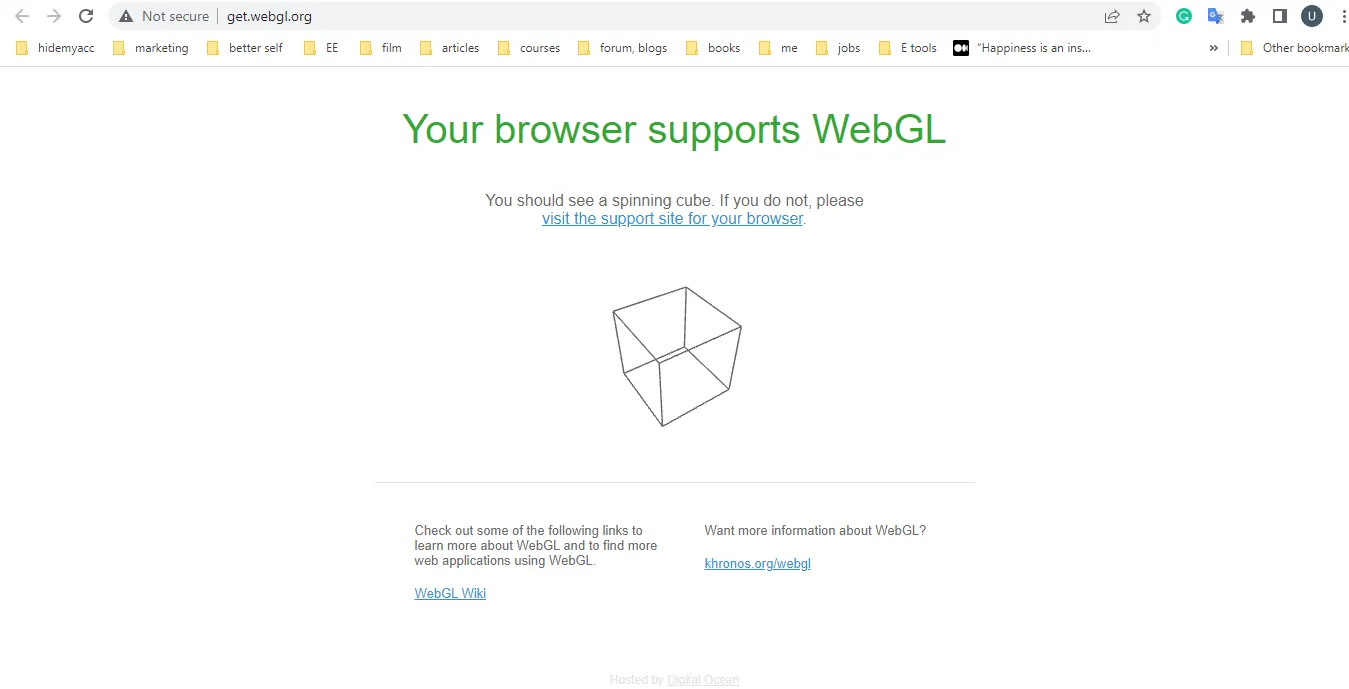
5.1. Enable and test WebGL on Chrome
Step 1: Enable WebGL
Open Chrome, go to:chrome://settings/system
Enable option Use hardware acceleration when available (blue)

Press Relaunch to restart the browser
Then go to:chrome://flags/
Search for keywords WebGL→ In the section WebGL Draft Extensions, select Enabled

Step 2: Check WebGL status
Access:chrome://gpu/
Press Ctrl + To find WebGL in the section Graphics Feature Status
If displayed Hardware accelerated on the WebGL or WebGL2 line → WebGL is enabled and working
Otherwise, you will see the item Problems Detected – reasons why hardware acceleration is not available

5.2. How to enable WebGL on Firefox
Step 1: Access advanced settings
Open Firefox, type about:config into the address bar
Press Accept the Risk and Continue

Find and adjust the following parameters:
webgl.disabled→ value false

webgl.force-enabled→ value true

webgl.enable-prototype-webgl2→ press Add if not already, set it to true

Step 2: Restart Firefox To apply the changes.
5.3. Enable WebGL on Microsoft Edge browser
Microsoft Edge has a similar process to Chrome.
Step 1: Enable hardware acceleration
Open Edge, typeedge://settings/system into the address bar
Enable option Use hardware acceleration when available (blue)
Restart browser

Step 2: Check WebGL status
Access:edge://gpu/
Press Ctrl + To find WebGL
If present Hardware accelerated WebGL or WebGL2 stream → WebGL works normally
If not, the item Problems Detected will tell you why hardware acceleration is disabled.

6. Is WebGL really safe?
WebGL has many potential security risks that users need to be aware of. That is the reason for the birth of WebGL Fingerprint – a method to identify browser fingerprints through the WebGL graphics library. In addition, WebRTC is also an important factor that helps websites detect devices by collecting digital fingerprints. You can learn more about WebRTC in our blog.
For those who make money online and manage multiple accounts, simply faking a Web graphics library is not enough. Platforms can still detect based on geolocation, operating system, screen resolution, user agent string, and many other parameters. To protect your account and avoid the risk of being banned, using an anti-detection browser like Hidemium is the optimal solution.
Hidemium not only helps to fake browser fingerprints but also supports creating and managing multiple accounts on the same software, helping you operate efficiently and safely. If interested, please contact us for more detailed advice.
>>> Learn more: What is WebRTC? Do websites collect WebRTC fingerprints?
7. Conclusion
This article has guided you on how to check and enable WebGL, helping to fix related issues and maintain stable, uninterrupted online activities. Hopefully this information will help you protect your account and improve your user experience.
Related Blogs

There is a point where a group chat stops being a management system. Usually it arrives quietly. You add the tenth contractor, or the second warehouse, or a support rotation in another timezone, and suddenly nobody can tell you who read the new returns policy, who finished the safety module, or which version of the shift roster is the real one. That is the problem this software category exists to[…]
.png)
In an era where artificial intelligence is increasingly developing, anti-bot systems and automatic detection mechanisms are also increasingly sophisticated, making finding a antidetect browser Being truly effective is more difficult than ever. However, Hidemium and MuLogin still stand out as two options worth considering with strong anonymity capabilities, helping to maintain stable operations[…]
In 2025, the need to manage multiple accounts on platforms like Facebook, Amazon, or TikTok is increasing, especially for affiliate marketers, e-commerce shop owners, and digital advertising experts. Indigo Browser, an antidetect browser aimed at the Russian market, was noted for its simple interface and basic fingerprinting capabilities. However, with limitations in performance, features, and[…]

Scaling a YouTube channel from a side project into a major marketing asset is a high-stakes endeavor. You need rapid growth to capture the algorithm's attention, but aggressive tactics can trigger YouTube's sophisticated detection systems, putting your entire channel at risk. The central challenge for every ambitious marketer is how to push the boundaries of growth without crossing the line into[…]

Selling on Etsy in 2026 is still one of the easiest ways to start an online business, but it’s no longer as simple as uploading a product and waiting for sales. The platform has grown significantly, with millions of buyers actively searching for specific products every day. That means opportunity is still there, but competition has increased, and only sellers with a clear strategy tend to[…]

Reaching the image creation limit in ChatGPT can significantly disrupt your creative process. You might be experimenting with ideas, refining every detail to get the perfect image—and then suddenly you're "blocked" because you've run out of attempts. This is a common situation for many people working with AI image creation.That's why more and more people are looking for ways to...Exceeding[…]
