
I. Introduction to B2Proxy Residential Proxies
B2Proxy Official Website
B2Proxy is a professional provider specializing in global residential proxy services, offering high-purity residential IPs sourced from real ISP home networks. These proxies are widely used in cross-border e-commerce, online advertising, data collection, social media management, and account registration and verification.
Key Features of B2Proxy IP Services
- Proxy Plans: Residential Proxies / Unlimited Residential Proxies / Static Residential Proxies
- Coverage: 195+ countries and regions worldwide
- IP Pool: 80M+ real residential IPs
- Protocols Supported: HTTP / SOCKS5
- Additional Benefits: 1GB free trial traffic, 24/7 customer support
B2Proxy provides highly available, anonymous, and low-risk residential IPs, making it an excellent match for use with the Hidemium anti-detect browser for multi-account isolation, anti-association protection, and long-term stable operations.
II. Setup Guide
Step 1: Register and Log In to Your B2Proxy Account
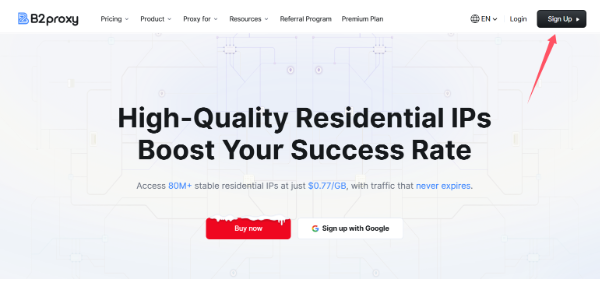
1. Visit the B2Proxy official website:
Click “Sign Up” in the top-right corner to create and log in to your account.
2. Enter the user dashboard and select a proxy plan that fits your needs. Available options include:
- Residential Proxies
- Static Residential Proxies
- Unlimited Residential Proxies
3. Go to the “Username / Password” page to generate your proxy credentials.
4. Configure the following parameters based on your requirements:
- Country / Region
- Session type
- Nearest proxy host
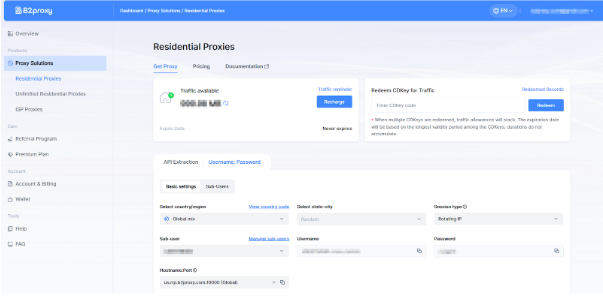
The generated proxy details will include:
- Proxy Host
- Port
- Username
- Password
Please save this information securely, as it will be required when configuring Hidemium
Step 2: Download and Register Hidemium
Download and install the client, then complete account registration and login.
Hidemium is a professional anti-detect browser that creates an independent browser fingerprint, local cache, and network environment for each account, effectively reducing account linkage and risk-control issues.
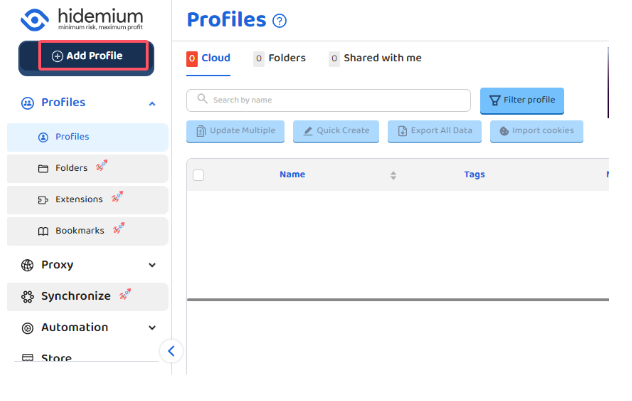
Step 3: Create a Browser Profile in Hidemium
After logging into Hidemium, click “Add Profile.”
Step 4: Bind B2Proxy Residential Proxy in Hidemium
In the browser profile configuration page, locate the Proxy Settings section and fill in the details as follows:
- Proxy Type: HTTP or SOCKS5
- IP / Host: Proxy host provided by B2Proxy
- Port: Corresponding port number
- Username: Proxy username
- Password: Proxy password
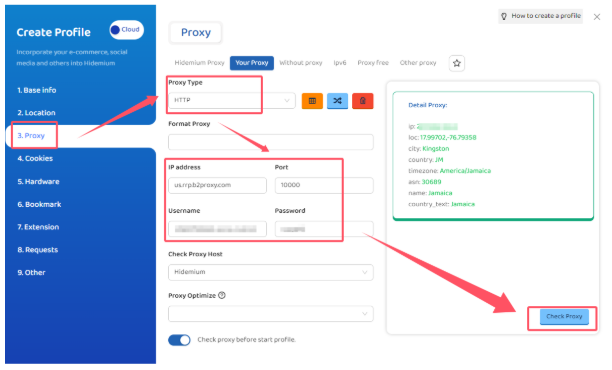
Step 5: Test the Proxy and Save the Configuration
After completing the setup, click “Check Proxy.”
Once the system confirms a successful connection, save the browser profile.
Hidemium will then automatically create:
- An independent browser fingerprint environment
- An isolated residential IP network environment
This effectively reduces the risk of account association and improves login success rates and overall stability.
III. Summary
By combining B2Proxy’s real residential proxies with Hidemium’s browser fingerprint isolation, you can effectively solve key challenges in multi-account operations:
- Preventing account linkage
- Creating more realistic and trusted login environments
- High IP purity with lower ban and risk-control rates
- Long-term account stability
- More efficient multi-account and team management
Whether you operate Amazon, TikTok Shop, Temu, Shopee, or independent websites, or engage in advertising campaigns, social media matrix management, or data scraping, the B2Proxy + Hidemium solution can significantly enhance account security and overall operational efficiency.
Related Blogs
Can You Browse Instagram Anonymously?Instagram is one of the most visited social media platforms in the world — but it's also one of the most aggressive when it comes to tracking user behavior. Whether you want to research competitors, view profiles without leaving traces, or simply protect your privacy, browsing Instagram anonymously has become increasingly important in 2026.The short answer is:[…]
Shadowrocket is an application Premium proxy for iOS devices, allowing users to secure connections, access region-restricted content, and improve internet connection performanceIn this article,Hidemium Antidetect Browserwill help you understandWhat is Shadowrocket?, how it works as well as instructions on how to install and use this application easily.1. What is Shadowrocket?Shadowrocket is a[…]

If you find Google Gemini quickly reaching its limits as the task becomes more complex, that's perfectly normal. Google applies quotas to prompts, conversations, and features — and the consumption increases rapidly with longer tasks, multiple files, or numerous exchanges.Therefore, each user may encounter limitations at different times. When you reach the limits of higher-end models like Pro or[…]
Creating an account to sell on Amazon is not easy for sellers. However, locked Amazon accounts are even more common problems. Losing an account is a significant loss for those who trade even for a day. This is unavoidable in the sales process. So what can you do when Amazon ban your account? Or how to minimize these risks? Find out below!What is a suspended Amazon account? Sanctions from[…]

Facebook can i see who viewed my profileUnderstanding Who Views Your Facebook Profile: Facts vs MythsIf you have ever posted a new profile picture, shared an exciting life update, or simply wondered if an old flame is checking up on you, you have likely asked yourself the ultimate social media question. We all want to know who is looking at our digital footprint. The curiosity surrounding[…]
.png)
Managing multiple accounts on Instagram is not a simple thing. Photos and videos aren’t synced to one account, confusing you with posting from one account to another. Using multiple accounts also makes it easy for you to be flagged as suspicious by the platform. So what is the optimal way to manage multiple accounts on Instagram? Stay tuned to the article for more details!What is the use of[…]
