How to manage multiple accounts on Instagram simple
.png)

Managing multiple accounts on Instagram is not a simple thing. Photos and videos aren’t synced to one account, confusing you with posting from one account to another. Using multiple accounts also makes it easy for you to be flagged as suspicious by the platform. So what is the optimal way to manage multiple accounts on Instagram? Stay tuned to the article for more details!
What is the use of creating multiple Instagram accounts?

How to manage multiple Instagram accounts
Managing multiple Instagram accounts effectively will bring a lot of benefits to your business:
- According to Instagram’s user behavior survey, most of them like and care about a niche topic or product. So instead of posting all of your content in a single account, you should create multiple Instagram accounts to attract more attention and higher levels of interest and engagement.
- The main reason people create multiple Instagram accounts is also that switching accounts are accessible. For example, You have a personal account and want to switch to a business or brand account without having to log out of this account and log in to another account.
- You get more specific analytics data when you have multiple Instagram accounts, personal and business. It helps you evaluate user behavior and develop an appropriate business plan.
- Favorable for those who do marketing, advertising, pr. For example, TunPham (a famous hot Tiktoker) has an account that creates food content and another account to sell junk food. It will make it easier for your followers to find products they’re interested in.
How many Instagram accounts can I create?
You may not know that “Instagram once encouraged users to register for multiple accounts in a time allowed.” That is also why Instagram still allows creating up to 5 Instagram accounts in the same email address.
However, with the Instagram application that manages multiple accounts on the same email, you need to pay attention to security. Therefore, the email you intend to register needs high security to limit the loss of access to your email account.
How to manage multiple Instagram accounts?
If you are a social media person or business on the Instagram platform, you have probably wondered, “Is there a way to manage multiple Instagram accounts?”. Here are the detailed instructions to do this at the same time, in the same place, without causing confusion or confusion.
Switch multiple Instagram accounts
Before you want to switch between accounts, it is required that you have added at least 2 accounts:
1. Tap your Profile page at the top left of the screen.
2. Continue to tap on the three dots that appear on the screen next to the account you selected.
3. When you’re ready to switch to another account, tap the name of the account you want to change.
Manage multiple accounts on Instagram
Post content to multiple Instagram accounts at once
Once you’ve added the accounts to the Instagram app, you can post posts all at once. Turn on posting to another account besides the one you want to post to and continue as usual.
Press the Post button in the top right corner to post. One caveat when posting to multiple Instagram accounts at once is that you must be mindful of photos and constantly post pictures or videos to the correct account.
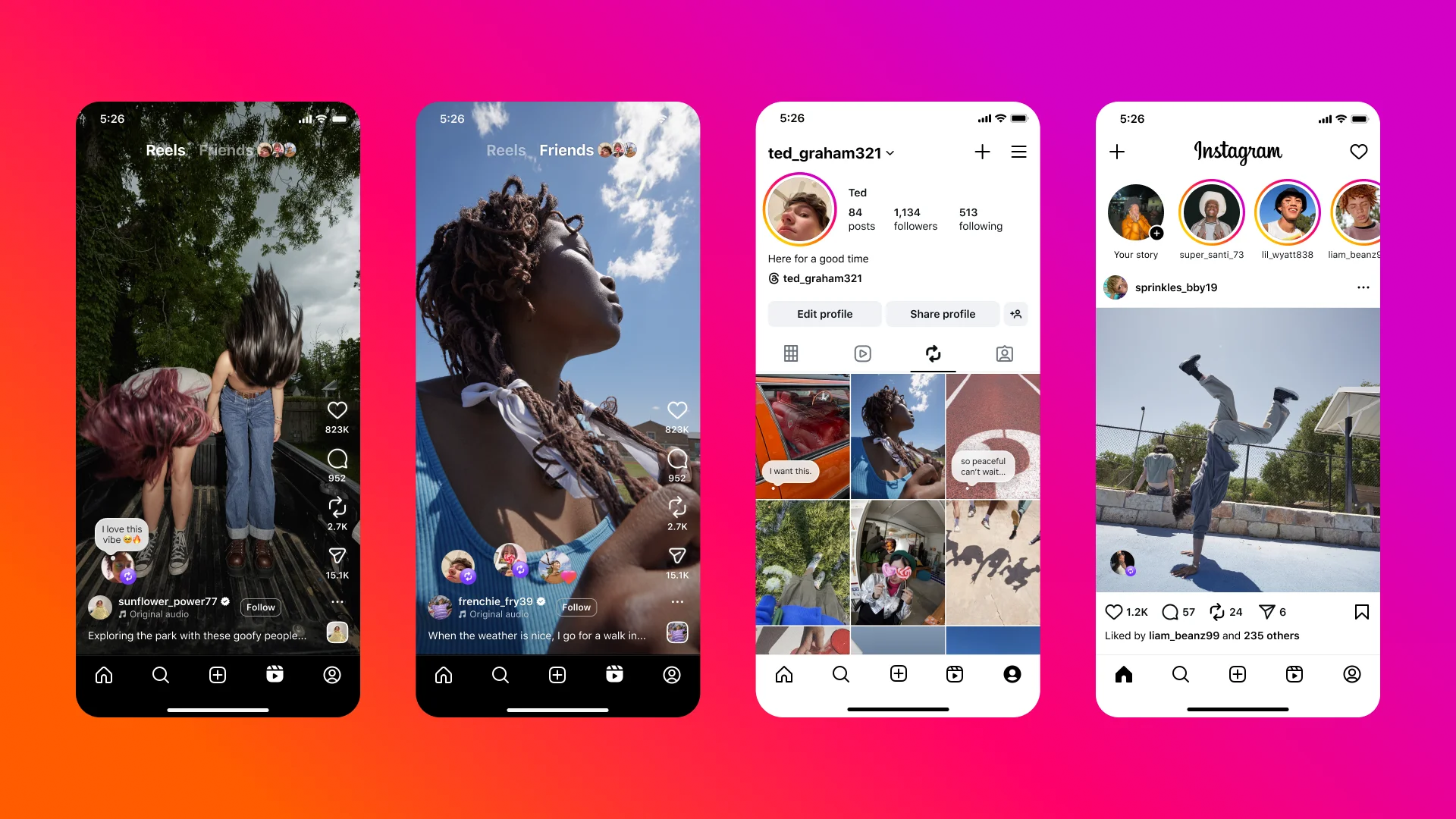
Enable notifications for multiple Instagram accounts
By adding a few Instagram accounts, you can receive activities and notifications from any or all accounts on your device. In particular, each notice will indicate the relevant account name in parentheses before the content of the message.
To enable this feature, you need to perform the following specific steps:
- Click on the icon with the Profile picture
- Select the three dashes (Menu)
- Click Settings
- Select Notifications
Here you have several options to enable notifications for the activities for which you want to receive notices:
- Turn on post notifications (comments, likes, etc.)
- Turn on message notifications
- Turn on notifications for new followers
- Follow the same steps as above for other accounts.
Manage multiple Instagram accounts with Hidemium( multibrowser)
Application to manage multiple Instagram accounts
Another way to manage multiple accounts on Instagram is to use a third-party app. That is Hidemium software; this application will help you manage social network accounts easily. With Hidemium, you can:
- Open different browsers at the same time on one device
- Can use an account without changing IP
- Cookie data sets and browser history are stored in the cloud
- Use a virtual browser to stay anonymous
- Manage countless accounts on social networks such as Facebook and Instagram, etc.
So it can be seen that managing multiple accounts on Instagram is not difficult. Hopefully, the detailed information on how to manage multiple accounts on Instagram will help you get the most out of the platform. From there, it allows you to save time, measure performance, and have a business development plan easier!
Related Blogs
I. Introduction to B2Proxy Residential ProxiesB2Proxy Official WebsiteB2Proxy is a professional provider specializing in global residential proxy services, offering high-purity residential IPs sourced from real ISP home networks. These proxies are widely used in cross-border e-commerce, online advertising, data collection, social media management, and account registration and verification.Key[…]
.png)
In the field of computer networks, port port is a familiar concept, acting as an important bridge in work Data transmission and connection between devices. Ports appear in both hardware and software, supporting effective communication between components in the system. So What is port?, what is its outstanding function and how is it classified? Let's go together Hidemium Antidetect Browser –[…]
Affiliate marketing continues to be one of the fastest-growing online money-making fields in 2025, offering numerous growth opportunities for both individuals and businesses. However, along with market expansion, challenges are becoming increasingly apparent. Major platforms are constantly upgrading their detection systems, tightening account management policies, and implementing geographical[…]
.png)
As internet users become more aware of the need to protect their personal information, hiding IP addresses and maintaining anonymity has become a priority. Whether you're trying to avoid unwanted ads, stay safe from cyber threats, or access restricted content, bypassing an IP ban can be essential. In this article, we'll explore the most popular methods to change or hide your IP address and ensure[…]
China is a country that applies strict Internet censorship with the "Great Firewall" system, making it difficult to access international websites and services. In that context, Free China VPN becomes an essential tool to help users overcome censorship barriers, ensuring free and safe access to the Internet. Together Hidemium Antidetect Browser discovered 7 Best Free Chinese VPNs in 2025 that you[…]

In the digital age, protecting personal information when accessing the internet has become an urgent need. Rent a VPN are increasingly being chosen by many people as a safe, flexible and budget-friendly solution. However, among a series of suppliers on the market, how to choose a cheap VPN service but still ensure performance, security and stability? Let's Hidemium Antidetect Browser Explore[…]
