Guide to Managing Large Numbers of Amazon Accounts


Managing multiple Amazon accounts always comes with the risk of account linking and mass suspension if the login environment is not kept “clean.”
In this article, we will guide you through how to build independent browsing environments, minimize account linking, and effectively manage multiple Amazon accounts using an anti-detect browser such as Hidemium.
1. Why Is Managing Large Numbers of Amazon Accounts So Challenging?
For those implementing Amazon sales growth strategies, owning multiple accounts is inevitable. However, Amazon is known as one of the strictest platforms in the world when it comes to fraud control. Just a small mistake in IP address or device configuration can cause your entire account system to be wiped out in an instant.
The most common issue is “Linked Accounts.” When Amazon detects multiple accounts sharing the same browser fingerprint, it will suspend all of them. This is when you need to know the most effective way to recover a suspended Amazon account to save the situation—but ideally, it’s still best to proactively explore a guide on creating a clean environment using an anti-detect browser to prevent suspensions from happening in the first place.

2. What Is a “Clean Environment” for Managing Amazon Accounts?
A clean environment for managing Amazon accounts is not simply about changing your IP address with a VPN or proxy. It includes:
Clean IP addresses: Not blacklisted by Amazon.
Unique hardware parameters: Screen resolution, fonts, WebGL, Canvas, Audio, and other attributes must differ for each account.
Natural cookies and browsing history: Making each account appear like it belongs to a real, individual user.
3. Hidemium – The Perfect Solution for Creating a Clean Environment
To manage dozens or even hundreds of accounts without having to buy dozens of physical computers, an anti-detect browser is an essential tool. Among them, Hidemium has emerged as a top choice for the Vietnamese MMO community.
Register and experience Hidemium now at: https://hidemium.io/
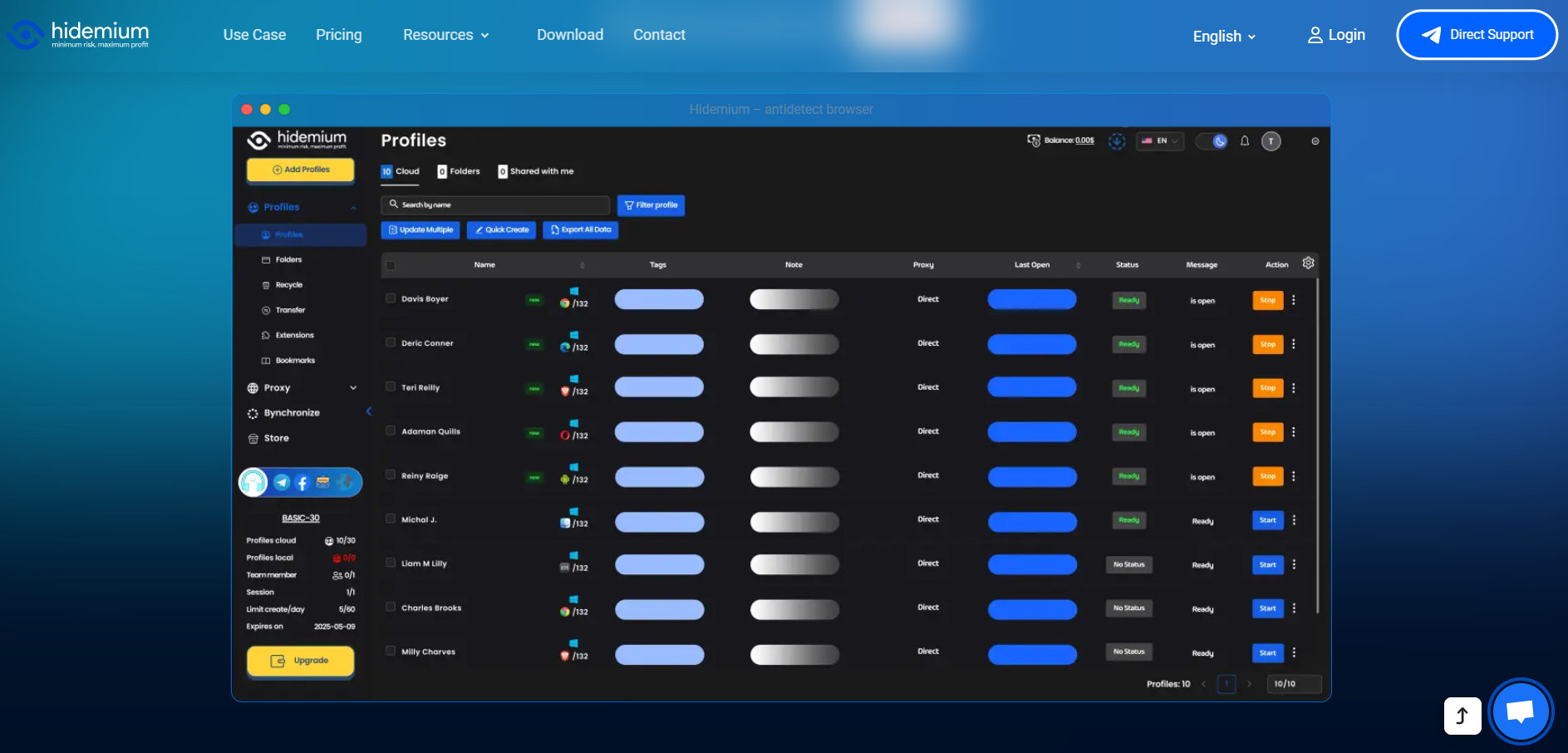
Hidemium allows you to create thousands of separate browser profiles. Each profile has a completely unique set of technical parameters, making Amazon’s algorithms believe that every account is being accessed from a different physical device.
4. Steps to Set Up an Amazon Account Management Environment in Hidemium
Step 1: Create a New Profile in Hidemium
Open the Hidemium application and select “Create New.” Here, you can customize parameters such as the operating system (Windows/macOS) and the browser version.
Step 2: Configure a Proxy
Each Amazon account requires its own unique IP address. You should use residential proxies for the highest level of trust. Hidemium supports easy and seamless proxy integration.
Step 3: Optimize the browser fingerprint
Hidemium automatically generates a random yet highly logical set of parameters. You can check how “clean” the environment is using websites such as Whoer.net or Pixelscan.net directly within the Hidemium browser.
Step 4: Start the account warming process
Once you have a clean environment, begin logging into your accounts. Don’t forget to explore 7 ways to make money on Amazon to choose a suitable business model, such as dropshipping or affiliate marketing.
5. Important Tips to Avoid Amazon Reviews and Checks
Use supporting tools: Don’t forget to combine your setup with 17 Amazon SEO tools to help your products stand out and optimize your store after successful account management.
Interaction schedule: Avoid logging in and making purchases or posting immediately. Spend the first 3–5 days casually browsing like a real user to build natural behavior patterns.
Do not reuse payment information: Each account on Hidemium should be linked to a separate payment method (VCC) to prevent account linking.
6. Conclusion
Building a system to manage large numbers of Amazon accounts is a complex technological challenge. To succeed, you must have a clean environment and a powerful anti-detect browser capable of bypassing Amazon’s multiple layers of security.
Hidemium is the “powerful ally” that helps you solve this problem professionally at a highly affordable cost. Don’t let all your hard work go up in smoke because of a small mistake in your browser fingerprint.
Download Hidemium now to protect your accounts: Download Hidemium
Related Blogs
Looking to expand your Print on Demand (POD) sales while keeping your account safe? Printify – one of the most popular POD platforms today – offers many attractive passive income opportunities. However, when you start scaling up to multiple accounts to optimize business efficiency, the risk of account suspension, data linking, or spam marking also increases.In this article, Hidemium will help you[…]
I. Introduction to B2Proxy Residential ProxiesB2Proxy Official WebsiteB2Proxy is a professional provider specializing in global residential proxy services, offering high-purity residential IPs sourced from real ISP home networks. These proxies are widely used in cross-border e-commerce, online advertising, data collection, social media management, and account registration and verification.Key[…]

Sales teams lose more revenue to bad CRM data than to any single competitor. Reps are told the CRM is the "source of truth," yet 27% of sales data sits inaccurate at any given moment, and reps burn roughly 546 hours a year cleaning it up. That is not a workflow issue. It is a mechanism failure. For years, the fix was more discipline: better templates, mandatory fields, quarterly hygiene projects.[…]

Managing multiple social media accounts sounds simple—until you actually do it.If you're handling 5, 10, or even 15 accounts, you probably know the feeling: writing similar captions, repeating the same workflow, and constantly switching between accounts. It quickly becomes time-consuming and hard to scale.That’s where a structured workflow using Claude AI can make a real difference. Instead of[…]
.png)
GenLogin is marketed as a user-friendly software with a simple interface and basic security features. However, claiming to be "safe" and "user-friendly" is not enough to confirm its actual effectiveness. Many users have reported concerns about the platform potentially exposing personal information and raised issues regarding lack of transparency, particularly related to the integration of the P2P[…]
.png)
Looking for a reliable unblocked browser to open websites that are restricted at school, work, or in your country? Below is an up-to-date, hands-on comparison of the 5 best unblocked browsers in 2026. Each one helps you get past firewalls and filters, and none of them require advanced tech skills — so you can start in minutes.The 5 Best Unblocked Browsers in 2026 (Quick List)Hidemium — Best[…]
