What is Telnet? Explore the Telnet protocol for remote access

Have you heard of Telnet but don't really understand how it works or its applications? In the world of networking technology, Telnet used to be one of the core tools for remote device management. The following article is from Antidetect Browser Hidemium will help you discover What is Telnet?, how it works, practical applications as well as weaknesses that have led to it being gradually replaced by modern protocols such as SSH.
1. What is Telnet?
Telnet (abbreviation ofTeletype Network) is a standard network protocol that allows remote connection and control of devices via a local network or the Internet. This protocol is commonly used to access systems over command line interface (CLI) like terminal or shell – mainly for network devices, servers and remote control systems.
Although more secure protocols have emerged today,Telnet is still considered an important platform in the history of network technology development.
>>> Learn more: What is a Port? Role and exact classification
2. History of Telnet protocol
Telnet was introduced in 1969, in the network development phase LOTTERY– the precursor to the modern Internet. This protocol was created with the goal of providing a solution for remote command line access, allowing users to connect to servers or devices from great distances.
According to documents from Internet Engineering Task Force (IETF), Telnet operates on the platform TCP/IP and use Gate 23 as the default for data transmission. This is a milestone in the process of wide area networking between devices.
>>> Learn more: What is Port 443? Its role and uses in internet security
3. Structure and operating mechanism of Telnet
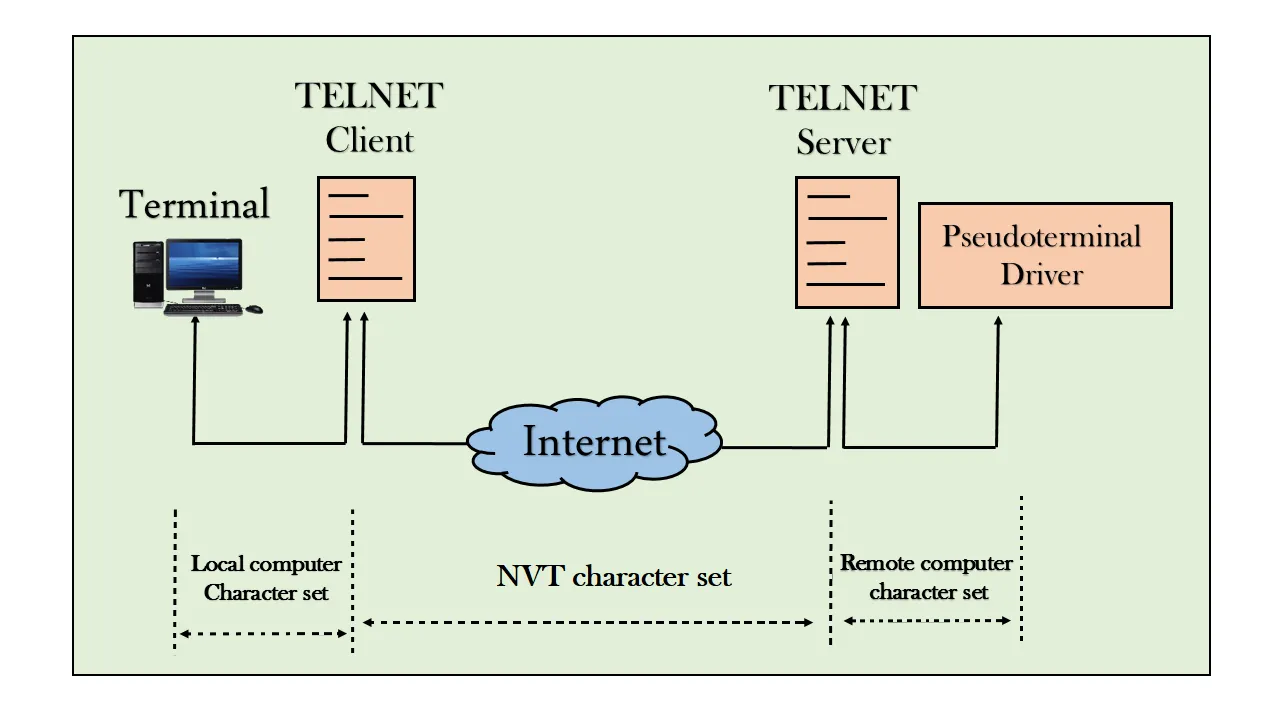
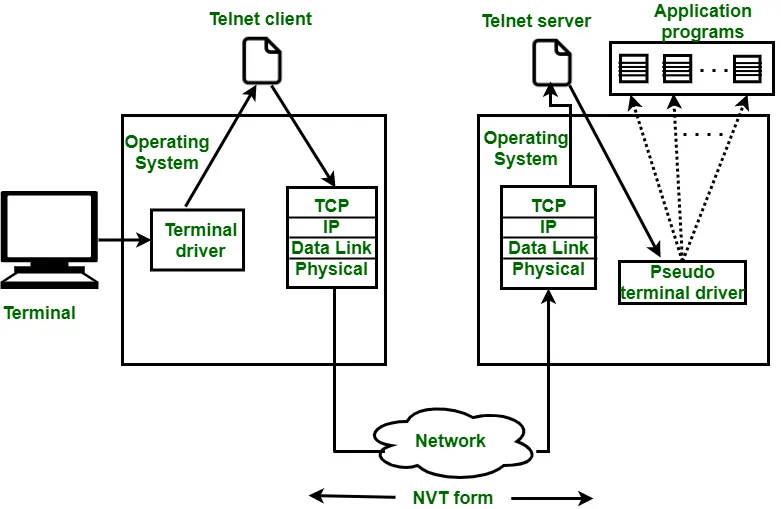
After understanding What is Telnet? and its origin, let's analyze how Telnet operates according to the model client-server:
Client: Is a user device, usually using Telnet software to send connection requests.
Server: Is the destination device that accepts connections and responds to commands from the client.
When the user initiates the connection, The client will send a request to the server via port 23. After successful authentication, the user can type commands directly as if using the local server.
However, one big downside of Telnet To be: data is transmitted in plain text, without encryption. This leaves information vulnerable to interception if transmitted over an unsecured network – why Telnet is rarely used today in environments that require high security..
>>> Learn more: What is Postman?The leading API testing solution for modern developers
4. Outstanding features of Telnet
Telnet Is a widely used remote control protocol, possessing many useful features in network system administration:
Remote device management: Allows access and control of devices such as routers, switches or servers without being on-site.
Check connection status: Supports checking network ports and connections between devices, helping to quickly detect and troubleshoot problems.
Easy to deploy: Telnet works through a simple command line interface, requiring no complex software installation.
In fact, a network administrator can reconfigure a router remotely in just a few minutes using Telnet – something that was once very difficult to do with a traditional wired network.
5. Disadvantages of Telnet and Alternatives
Telnet Provides convenience, but this protocol has serious security limitations: all transmitted data, including username and password, are not encrypted, making the system vulnerable to attack.
One Cisco 2020 report shows the attacks in the form of "man-in-the-middle" Telnet-targeted attacks still account for a high percentage of network security incidents.
The effective alternative is SSH (Secure Shell)– modern security protocols with the ability to Encrypt all data, absolutely protects information when accessing and managing the system remotely. Therefore, SSH is gradually replacing Telnet in most environments that require high security.
>>> Learn more: What is a PAN Network? Advantages, Disadvantages and Applications of PAN
6. Comparing Telnet and SSH: Which Protocol is More Suitable?
Criteria | Telnet | SSH |
| Security | No encryption | Encrypt all transmitted data |
| Authentication | Basic (username and password) | Support for public key authentication |
| Main application | Simple network management | Secure, in-depth network management |
Summary: SSH is clearly superior in terms of security and is the optimal choice for modern network environments. However, Telnet still used in some specific situations that do not require a high level of security, such as quick internal connection testing.
>>> Learn more: What is Topology? Common types of Topology in LAN
7. Detailed instructions on how to install Telnet for Windows, Linux and MacOS
How to install Telnet on Windows:
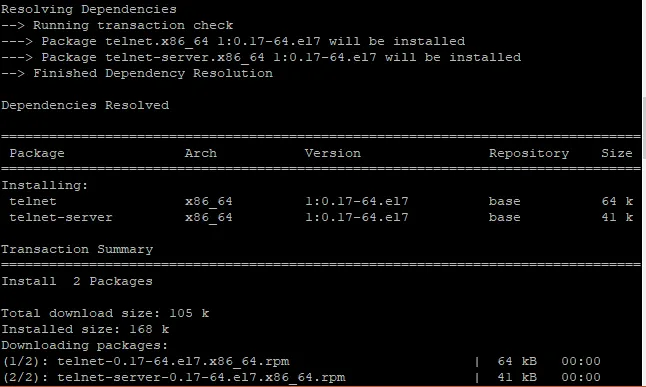
To enable Telnet on Windows operating system, follow these steps:
Open Control Panel > Programs > Turn Windows features on or off.
Find and selectTelnet Client, then pressOKto complete the installation.
Open Command Prompt And use the syntax:telnet [ip address] [port]to connect.
How to use Telnet on Linux/Mac:
Open Terminal On your operating system.
Enter command:telnet [ip address] [port]to proceed with the connection.
You can try connecting to your home router if you know the IP address and corresponding port to experience Telnet.
8. Summary of basic Telnet and SSH commands for administrators
Below is a list of commonly used commands in Unix/Linux operating systems, especially useful when accessing remotely via the protocol SSH – a more secure alternative to Telnet:
Command | Function description |
| cd | Move to another folder. For example: cd folder |
| pwd | Show current directory path |
| ls | List the contents of a directory. Use ls -a, ls -l, or ls - her to see details |
| cat | View the contents of a file. For example: cat file.txt |
| mkdir | Create a new folder. For example: mkdir new_folder |
| rmdir | Delete empty folders. For example: rmdir folder |
| cp | Copy a file or folder. For example: cp file.txt new_file.txt |
| mv | Move or rename a file/folder. For example: mv file.txt new_name.txt |
| rm | Delete a file or folder. Use rm file.txt or rm -rf folder to delete the entire data folder |
| grip | Search for a text string in a file. For example: grep "viet" file.php |
| takes | Compress or decompress formats.takes. For example: tar -xvf files.tar |
| zip | Compress files/folders to format.zip. For example: zip backup.zip file.php |
| unzip | Unzip the file.zip. For example: unzip -aL file.zip |
Mastering these basic commands will help you manage your system efficiently and professionally when operating remotely via SSH or Telnet.
Telnet was one of the first network protocols to accompany the development of the Internet, allowing remote connections to network devices via command lines. However, due to its lack of support for data encryption, Telnet is no longer an optimal choice for environments requiring high security.
In that context, SSH has become a more popular alternative due to its ability to encrypt entire sessions, effectively protecting user data and accounts.
If you are learning how to remotely administer systems or operate Linux servers, becoming familiar with Telnet, SSH, and related commands is a necessary first step.
Hidemium Hopefully this article has helped you better understand how to use Telnet as well as more modern and secure alternatives for remote system management.
Related Blogs
.png)
Why People Are Looking for a Multilogin Alternative in 2026Multilogin is the oldest and most technically sophisticated antidetect browser in the market. Its fingerprint modification happens at the C++ engine level rather than via JavaScript injection — meaning the spoofed fingerprints are genuinely harder to detect because there are no injection artifacts for anti-bot systems to find.But "hardest[…]

Shortening links to earn money is becoming more and more popular in the online money-making community thanks to its simplicity, accessibility and high efficiency. However, to ensure a stable income and avoid risks, choosing a reputable and safe link shortening website is an extremely important factor. In this article, Antidetect Hidemium will introduce the top 8 best link shortening platforms to[…]

When managing multiple accounts on the same device, many individuals and businesses face issues such as unstable profiles and frequent account suspensions due to overlapping fingerprints, IP addresses, or behavioral patterns. This is where Antidetect Browsers become a foundational solution—giving each account its own distinct “digital identity,” enabling more stable operation and making detection[…]

IPv6 (Internet Protocol version 6) is the latest Internet protocol designed to replace IPv4, which is gradually running out of available addresses. With its 128-bit length, IPv6 provides an almost unlimited number of IP addresses while also improving connection speed, security, and support for IoT devices.However, not all users know whether their network already supports IPv6. Below are 4 simple[…]

Accessing blocked websites in Vietnam is no longer too difficult if you know how to use it. Proxy through firewall properly. This is an ideal solution, which helps free internet access, just to make sure safety and security of personal information. Together Hidemium Antidetect Browser Discover the 3 most effective methods of using Proxy to bypass firewalls today.1. Use free Proxy websites to[…]

What is the best Incogniton alternative in 2026?The best Incogniton alternative in 2026 is Hidemium—an Incogniton alternative for teams that need more than basic browser profile management. Hidemium is a strong choice for users who want to organize multiple browser profiles, assign proxies, manage team workflows, separate online workspaces, and scale multi-account operations with less[…]
